- All products
- Development Boards
- ESP8266
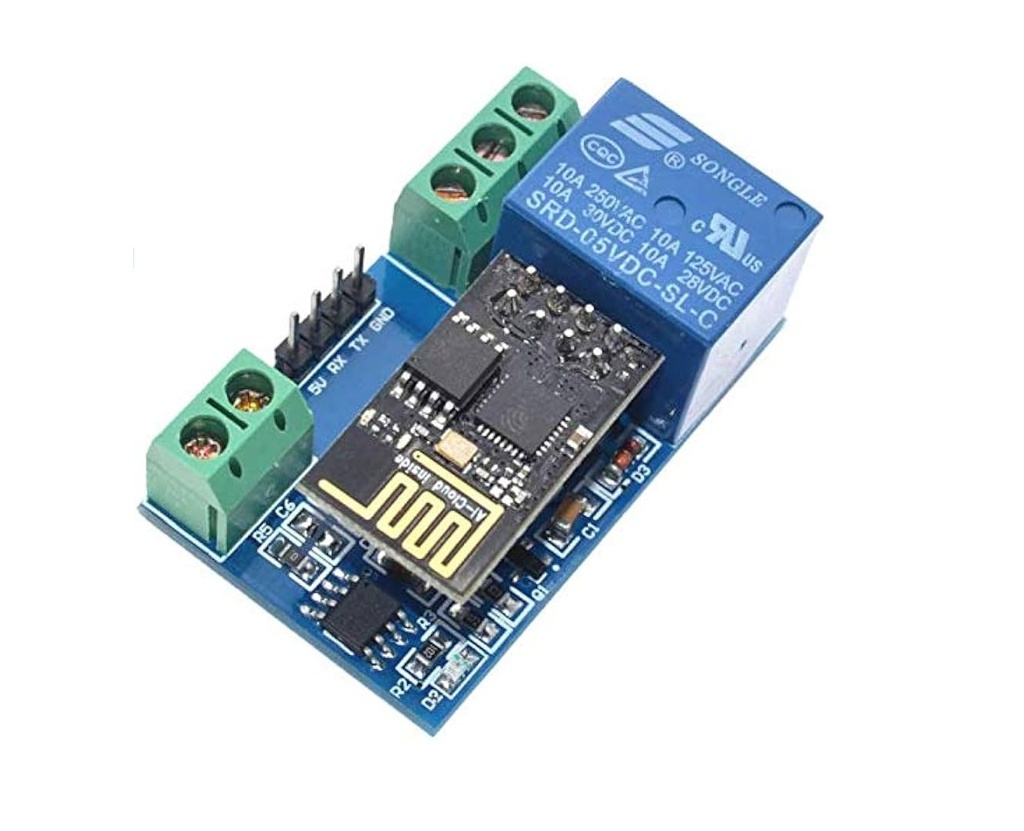
- ESP8266 ESP-01 WIFI Wireless with 1Ch Relay IoT Module
- ESP8266
Features:
- Two working modes: Direct connection or router-based communication
- Supports SmartConfig for easy setup of WiFi credentials
- Can be used as a USB relay (when ESP-01 is removed)
- Transmission range up to 100 meters in open space
- Compatible with apps like ESP Touch--Demo and EasyTCP--20
- Default baud rate: 9600 (configurable via AT commands)
Specifications:
- Model: ESP8266 (ESP-01)
- Channel: 1-channel relay
- Relay Specs: 5V 10A 250V AC / 10A 30V DC
- Board Size: 59 x 40 mm
- Weight: 36g (approx)
- Interfaces: UART debug, STM8 SWIM programming port
Operating Instructions:
- Prepare a 5V/1A power adapter and install the "ESP Touch--Demo" app.
- Connect power to IN+ and IN- of the module.
- Install "EasyTCP--20" app to send HEX-based relay control commands.
Working Modes:
Mode 1 – Direct Connection (AP Mode)
- Plug in ESP-01. After ~4 seconds, green LED blinks every 2 seconds (ready state).
- Connect phone directly to ESP-01’s AP WiFi signal.
- Open "EasyTCP--20", tap "CONNECT", and send relay commands via gray buttons.
Mode 2 – Router-Based Connection (STA Mode)
- Plug in ESP-01, press S1 to enter Mode 2. Blue LED flashes every 0.5s (waiting).
- Use "ESP Touch--Demo" app to enter router password and begin configuration.
- Upon success, ESP-01 connects to router and displays its IP (e.g., 192.168.0.189).
- Open "EasyTCP--20", enter IP, tap "CONNECT" to control the relay.
Warm Tips:
- Initial WiFi setup may take ~1 minute. Subsequent connections take ~20 seconds.
- To reset WiFi settings, press the S2 button or power cycle the module.
- If signal is weak, reconnection will be attempted automatically (green LED behavior indicates status).
- If disconnected for more than 6 minutes, manually reconnect via the "CONNECT" button in "EasyTCP--20".
- Only when the green LED blinks every 2 seconds or is steady can the relay be operated.
Features:
- Two working modes: Direct connection or router-based communication
- Supports SmartConfig for easy setup of WiFi credentials
- Can be used as a USB relay (when ESP-01 is removed)
- Transmission range up to 100 meters in open space
- Compatible with apps like ESP Touch--Demo and EasyTCP--20
- Default baud rate: 9600 (configurable via AT commands)
Specifications:
- Model: ESP8266 (ESP-01)
- Channel: 1-channel relay
- Relay Specs: 5V 10A 250V AC / 10A 30V DC
- Board Size: 59 x 40 mm
- Weight: 36g (approx)
- Interfaces: UART debug, STM8 SWIM programming port
Operating Instructions:
- Prepare a 5V/1A power adapter and install the "ESP Touch--Demo" app.
- Connect power to IN+ and IN- of the module.
- Install "EasyTCP--20" app to send HEX-based relay control commands.
Working Modes:
Mode 1 – Direct Connection (AP Mode)
- Plug in ESP-01. After ~4 seconds, green LED blinks every 2 seconds (ready state).
- Connect phone directly to ESP-01’s AP WiFi signal.
- Open "EasyTCP--20", tap "CONNECT", and send relay commands via gray buttons.
Mode 2 – Router-Based Connection (STA Mode)
- Plug in ESP-01, press S1 to enter Mode 2. Blue LED flashes every 0.5s (waiting).
- Use "ESP Touch--Demo" app to enter router password and begin configuration.
- Upon success, ESP-01 connects to router and displays its IP (e.g., 192.168.0.189).
- Open "EasyTCP--20", enter IP, tap "CONNECT" to control the relay.
Warm Tips:
- Initial WiFi setup may take ~1 minute. Subsequent connections take ~20 seconds.
- To reset WiFi settings, press the S2 button or power cycle the module.
- If signal is weak, reconnection will be attempted automatically (green LED behavior indicates status).
- If disconnected for more than 6 minutes, manually reconnect via the "CONNECT" button in "EasyTCP--20".
- Only when the green LED blinks every 2 seconds or is steady can the relay be operated.