- All products
- Displays
- Raspberry Pi 7" Touchscreen Display (Official)
- Displays
Features:
- Versatile Applications: Transform your Raspberry Pi into a touchscreen tablet, control panel, infotainment system, or standalone embedded device.
- High-Quality Display: 7-inch screen with 800 x 480 resolution delivering clear and vibrant visuals.
- Responsive Multi-Touch: Capacitive touchscreen supporting up to 10 simultaneous touch points for smooth interaction.
- Simplified Connectivity: Requires only GPIO power and a DSI ribbon cable connection for operation.
- On-Screen Keyboard Support: Advanced drivers enable virtual keyboard functionality, reducing the need for external input devices.
- IoT Ready: Ideal for building smart home systems, automation panels, and connected devices using Python and Raspberry Pi.
- Educational Friendly: Compatible with a wide range of Raspberry Pi educational tools and software, enhancing interactive learning.
- Compact Integration: Adapter board manages power and signal conversion efficiently for a clean setup.
Specifications:
- Display Size: 7 inches
- Resolution: 800 x 480 pixels
- Frame Rate: 60 FPS
- Touch Type: Capacitive Multi-Touch (up to 10 points)
- Color Depth: 24-bit RGB
- Viewing Angle: 70°
- Interface: DSI (Display Serial Interface)
- Power Source: Raspberry Pi GPIO (5V)
- Compatibility:
- Raspberry Pi 4, 3B+, 3B, 2B
- Not compatible with Raspberry Pi Zero / Zero W (no DSI port)
- Mounting holes not compatible with Model A and Model B (original versions)
Notes:
- Ensure correct orientation settings are configured in the Raspberry Pi system if needed.
- DSI connection is mandatory; HDMI cannot be used with this display.
- Some OS updates may require recalibration or configuration adjustments.
- Handle the ribbon cable carefully to avoid damage during installation.
How to Use:
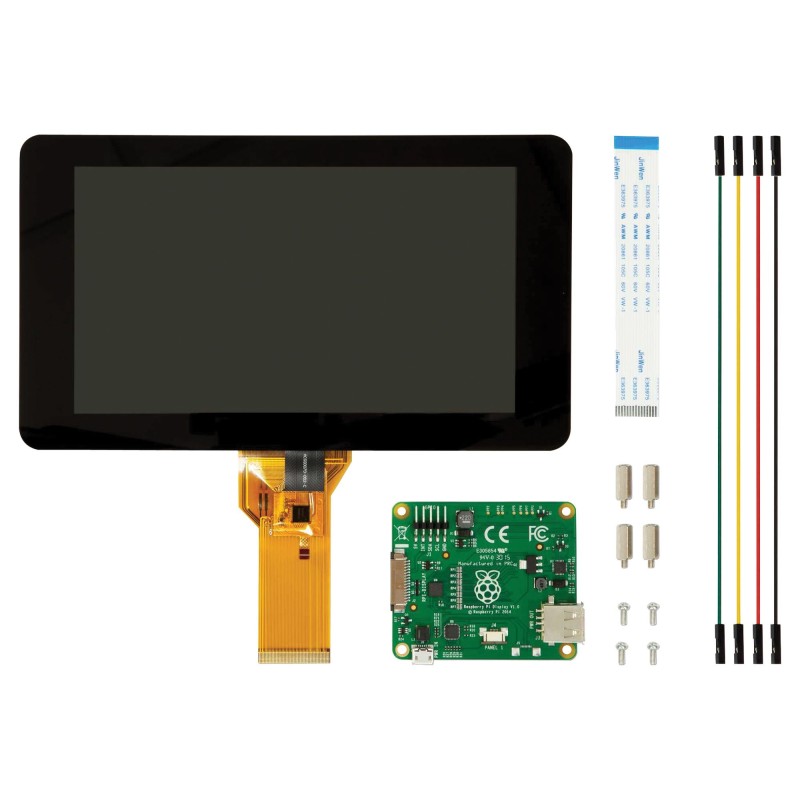
- Connect the display to the Raspberry Pi using the provided DSI ribbon cable.
- Power the display via the GPIO pins using the included jumper wires.
- Secure the display and adapter board using the provided screws and stand-offs.
- Power on the Raspberry Pi and install or verify touchscreen drivers.
- Configure display orientation and calibration if required.
- Begin developing or running touch-enabled applications.
Features:
- Versatile Applications: Transform your Raspberry Pi into a touchscreen tablet, control panel, infotainment system, or standalone embedded device.
- High-Quality Display: 7-inch screen with 800 x 480 resolution delivering clear and vibrant visuals.
- Responsive Multi-Touch: Capacitive touchscreen supporting up to 10 simultaneous touch points for smooth interaction.
- Simplified Connectivity: Requires only GPIO power and a DSI ribbon cable connection for operation.
- On-Screen Keyboard Support: Advanced drivers enable virtual keyboard functionality, reducing the need for external input devices.
- IoT Ready: Ideal for building smart home systems, automation panels, and connected devices using Python and Raspberry Pi.
- Educational Friendly: Compatible with a wide range of Raspberry Pi educational tools and software, enhancing interactive learning.
- Compact Integration: Adapter board manages power and signal conversion efficiently for a clean setup.
Specifications:
- Display Size: 7 inches
- Resolution: 800 x 480 pixels
- Frame Rate: 60 FPS
- Touch Type: Capacitive Multi-Touch (up to 10 points)
- Color Depth: 24-bit RGB
- Viewing Angle: 70°
- Interface: DSI (Display Serial Interface)
- Power Source: Raspberry Pi GPIO (5V)
- Compatibility:
- Raspberry Pi 4, 3B+, 3B, 2B
- Not compatible with Raspberry Pi Zero / Zero W (no DSI port)
- Mounting holes not compatible with Model A and Model B (original versions)
Notes:
- Ensure correct orientation settings are configured in the Raspberry Pi system if needed.
- DSI connection is mandatory; HDMI cannot be used with this display.
- Some OS updates may require recalibration or configuration adjustments.
- Handle the ribbon cable carefully to avoid damage during installation.
How to Use:
- Connect the display to the Raspberry Pi using the provided DSI ribbon cable.
- Power the display via the GPIO pins using the included jumper wires.
- Secure the display and adapter board using the provided screws and stand-offs.
- Power on the Raspberry Pi and install or verify touchscreen drivers.
- Configure display orientation and calibration if required.
- Begin developing or running touch-enabled applications.