Features:
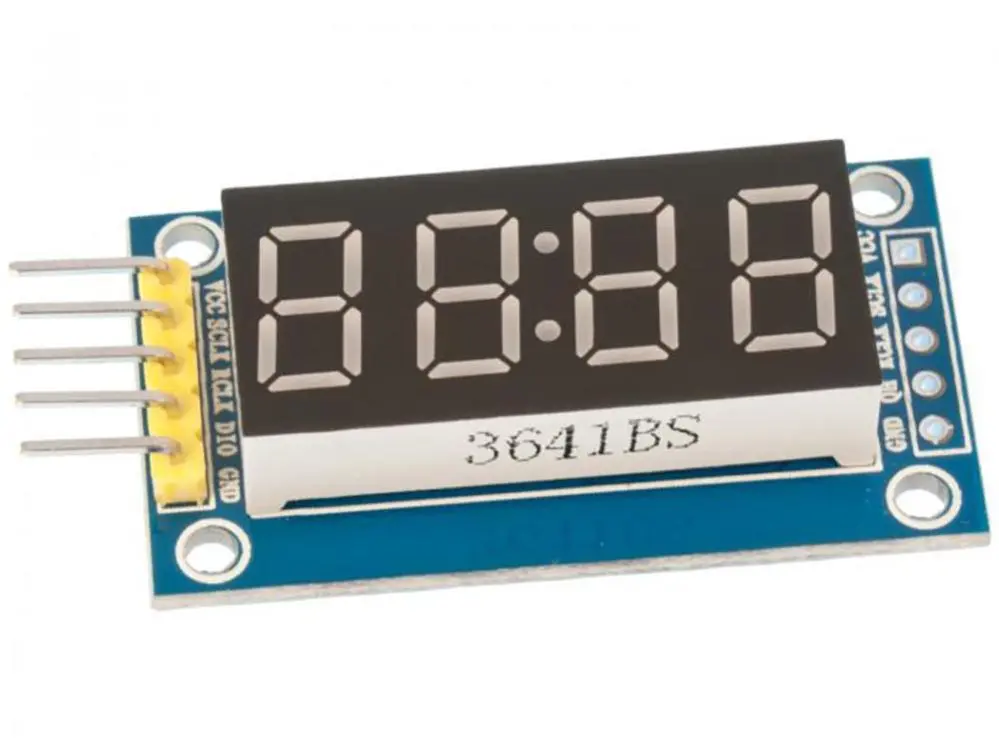
- 4-digit 7-segment LED display with bright red illumination
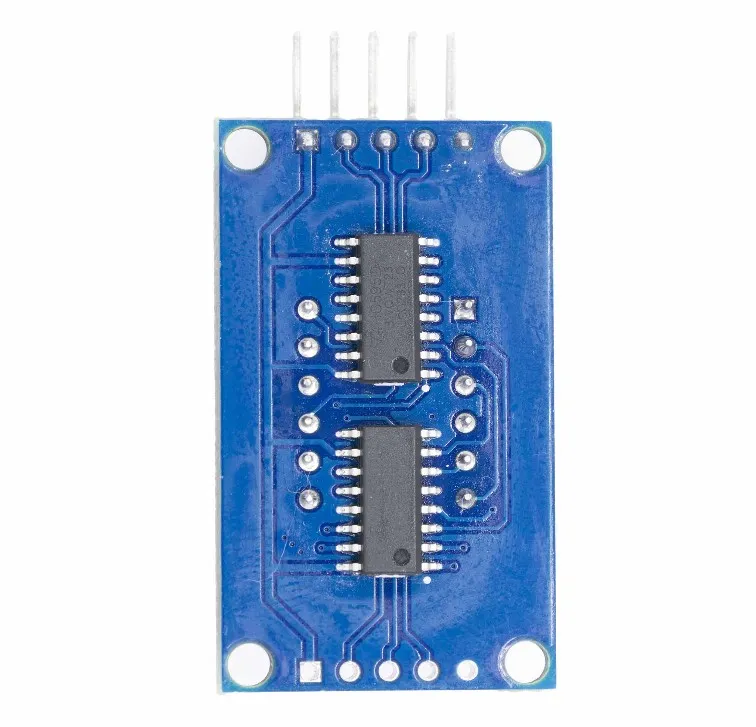
- Integrated dual 74HC595 shift registers for simplified control
- Serial IN Parallel OUT (SIPO) communication protocol
- Requires only 3 control pins from the microcontroller
- Expandable by cascading additional 74HC595 shift registers
- Includes decimal point LEDs for each digit
- Compact and easy-to-use module for embedded applications
- Compatible with Arduino and other microcontrollers
Principle of Work:
The module operates using the Serial IN Parallel OUT (SIPO) principle of the 74HC595 shift registers. Data is sent serially from the microcontroller through the data pin and shifted into the register using the clock signal. Once the data is loaded, the latch pin updates the outputs simultaneously. By rapidly updating each digit (multiplexing), the display appears to show all digits continuously. The shift registers control which segments are lit for each digit, enabling dynamic numerical display with minimal hardware complexity.
Pinout:
- VCC: Power supply (3.3V–5V)
- GND: Ground
- SDI: Serial Data Input (Data pin)
- CLK: Clock input
- LOAD: Latch pin (Register clock)
Applications:
- Digital clocks and timers
- Frequency counters and measurement devices
- Scoreboards and counters
- Embedded system displays
- Industrial control panels
- DIY electronics projects
Circuit:
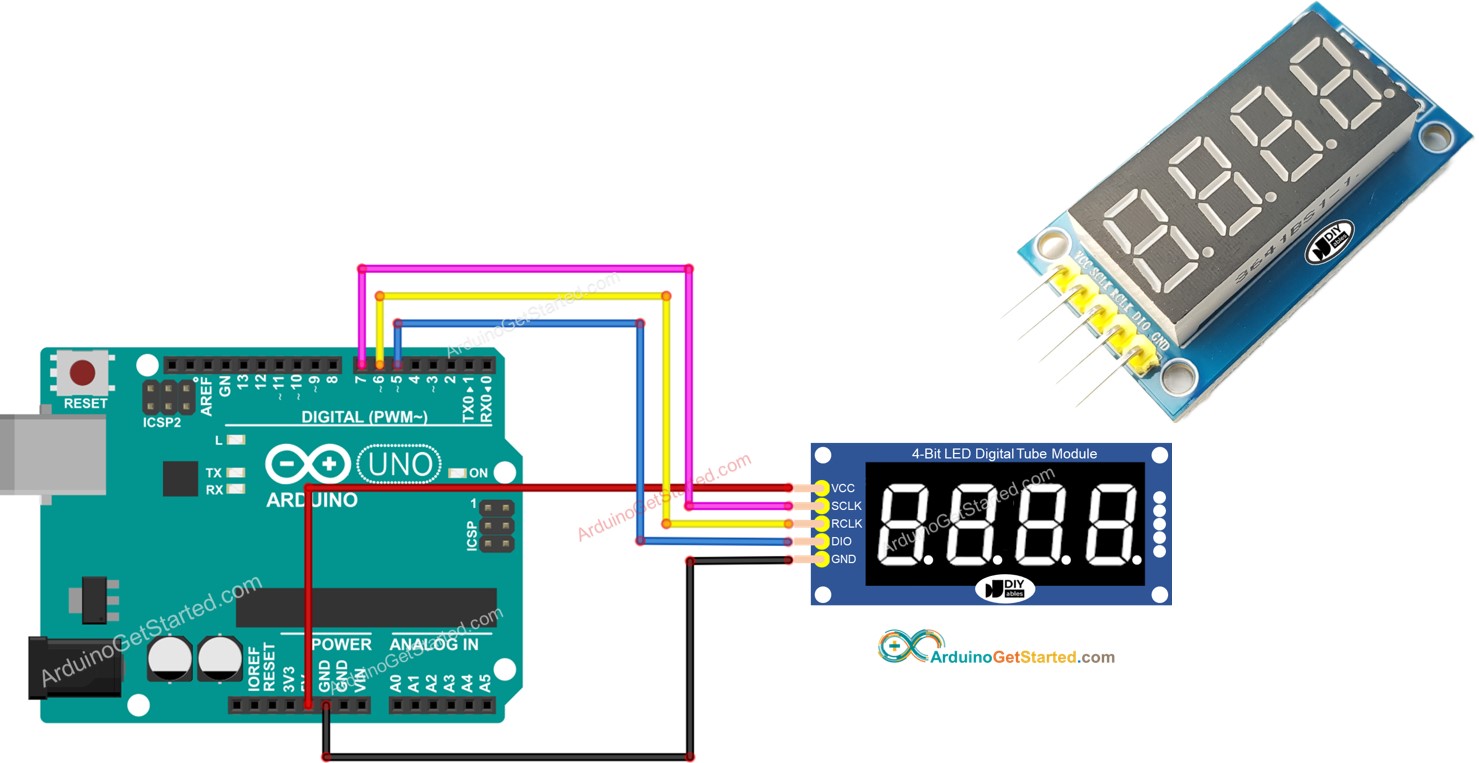
- VCC to 5V on Arduino
- GND to GND
- The Arduino pin 7 is connected to SCLK
- The Arduino pin 6 is connected to RCLK
- This e Arduino pin 5 connected to DIO
Library:
To use this module, install the DIYables_4Digit7Segment_74HC595 library:
- Download the library from GitHub
- Open Arduino IDE
- Go to Sketch > Include Library > Add .ZIP Library
- Select the downloaded file
Code:
#include "DIYables_4Digit7Segment_74HC595.h" // DIYables_4Digit7Segment_74HC595 library

#define SCLK 7 // The Arduino pin connected to SCLK
#define RCLK 6 // The Arduino pin connected to RCLK
#define DIO 5 // The Arduino pin connected to DIO

DIYables_4Digit7Segment_74HC595 display(SCLK, RCLK, DIO);

void setup() {
 Serial.begin(9600);

 display.printInt(-13, false); // you can display a value from -999 to 9999
 //display.printInt(-132, false);
 //display.printInt(9132, false);
 //display.printInt(132, false);
 //display.printInt(32, false);
 //display.printInt(2, false);
 //display.printInt(2, true);
}

void loop() {
 display.loop(); // MUST call the display.loop() function in loop()

 // DO SOMETHING HERE
 // NOTE: do NOT use the delay() function in loop because it affects to the multiplexing
}
Technical Details:
- Display Type: 4-digit 7-segment LED
- Segment Height: 12.7 mm
- Display Color: Red
- Driver IC: 2 × 74HC595
- Operating Voltage: 3.3V – 5V
- Interface: Serial (3-wire control)
- Dimensions: 42 × 24 × 12 mm
Resources:
- DIYables_4Digit7Segment_74HC595 library . This library can be used for Arduino, ESP32, ESP8266
- DIYables_4Digit7Segment_74HC595 Library Reference
Features:
- 4-digit 7-segment LED display with bright red illumination
- Integrated dual 74HC595 shift registers for simplified control
- Serial IN Parallel OUT (SIPO) communication protocol
- Requires only 3 control pins from the microcontroller
- Expandable by cascading additional 74HC595 shift registers
- Includes decimal point LEDs for each digit
- Compact and easy-to-use module for embedded applications
- Compatible with Arduino and other microcontrollers
Principle of Work:
The module operates using the Serial IN Parallel OUT (SIPO) principle of the 74HC595 shift registers. Data is sent serially from the microcontroller through the data pin and shifted into the register using the clock signal. Once the data is loaded, the latch pin updates the outputs simultaneously. By rapidly updating each digit (multiplexing), the display appears to show all digits continuously. The shift registers control which segments are lit for each digit, enabling dynamic numerical display with minimal hardware complexity.
Pinout:
- VCC: Power supply (3.3V–5V)
- GND: Ground
- SDI: Serial Data Input (Data pin)
- CLK: Clock input
- LOAD: Latch pin (Register clock)
Applications:
- Digital clocks and timers
- Frequency counters and measurement devices
- Scoreboards and counters
- Embedded system displays
- Industrial control panels
- DIY electronics projects
Circuit:
- VCC to 5V on Arduino
- GND to GND
- The Arduino pin 7 is connected to SCLK
- The Arduino pin 6 is connected to RCLK
- This e Arduino pin 5 connected to DIO
Library:
To use this module, install the DIYables_4Digit7Segment_74HC595 library:
- Download the library from GitHub
- Open Arduino IDE
- Go to Sketch > Include Library > Add .ZIP Library
- Select the downloaded file
Code:
#include "DIYables_4Digit7Segment_74HC595.h" // DIYables_4Digit7Segment_74HC595 library

#define SCLK 7 // The Arduino pin connected to SCLK
#define RCLK 6 // The Arduino pin connected to RCLK
#define DIO 5 // The Arduino pin connected to DIO

DIYables_4Digit7Segment_74HC595 display(SCLK, RCLK, DIO);

void setup() {
 Serial.begin(9600);

 display.printInt(-13, false); // you can display a value from -999 to 9999
 //display.printInt(-132, false);
 //display.printInt(9132, false);
 //display.printInt(132, false);
 //display.printInt(32, false);
 //display.printInt(2, false);
 //display.printInt(2, true);
}

void loop() {
 display.loop(); // MUST call the display.loop() function in loop()

 // DO SOMETHING HERE
 // NOTE: do NOT use the delay() function in loop because it affects to the multiplexing
}
Technical Details:
- Display Type: 4-digit 7-segment LED
- Segment Height: 12.7 mm
- Display Color: Red
- Driver IC: 2 × 74HC595
- Operating Voltage: 3.3V – 5V
- Interface: Serial (3-wire control)
- Dimensions: 42 × 24 × 12 mm