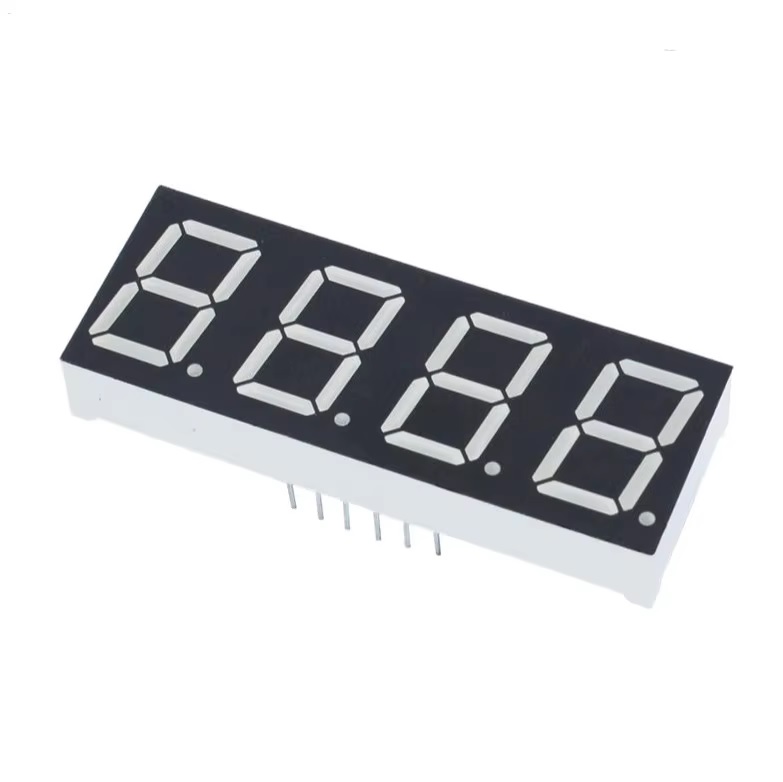
Features:
- 4-digit 7-segment LED display with bright red illumination
- Common cathode configuration for easy interfacing
- Supports numeric (0–9), hexadecimal (A–F), and basic symbols
- Standard 2.54mm pin spacing compatible with breadboards
- Suitable for direct use with microcontrollers
- Low cost and efficient display solution
- Works with 3.3V to 5V systems
- Widely used in household appliances and embedded systems
Principle of Work:
The display operates by lighting specific LED segments to form numbers or characters. In a common cathode configuration, the selected digit is activated by connecting its cathode to ground, while the required segments are powered by applying a positive voltage.
To display multiple digits, multiplexing is used. The microcontroller rapidly switches between digits, activating one digit at a time while updating the segment data. Due to persistence of vision, all digits appear continuously lit to the human eye.
Pinout:
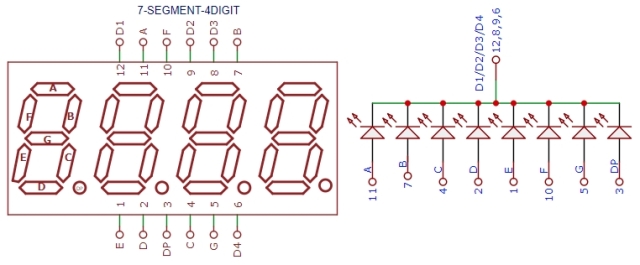
- Segment Pins (A–G, DP): Control individual LED segments
- Digit Pins (D1–D4): Select active digit (common cathode)
- Common Cathode: Connect to GND
Applications:
- Digital clocks and timers
- Temperature and voltage displays
- Counters and scoreboards
- Household appliances (microwaves, washing machines, etc.)
- Embedded system user interfaces
- Educational and prototyping projects
Circuit:
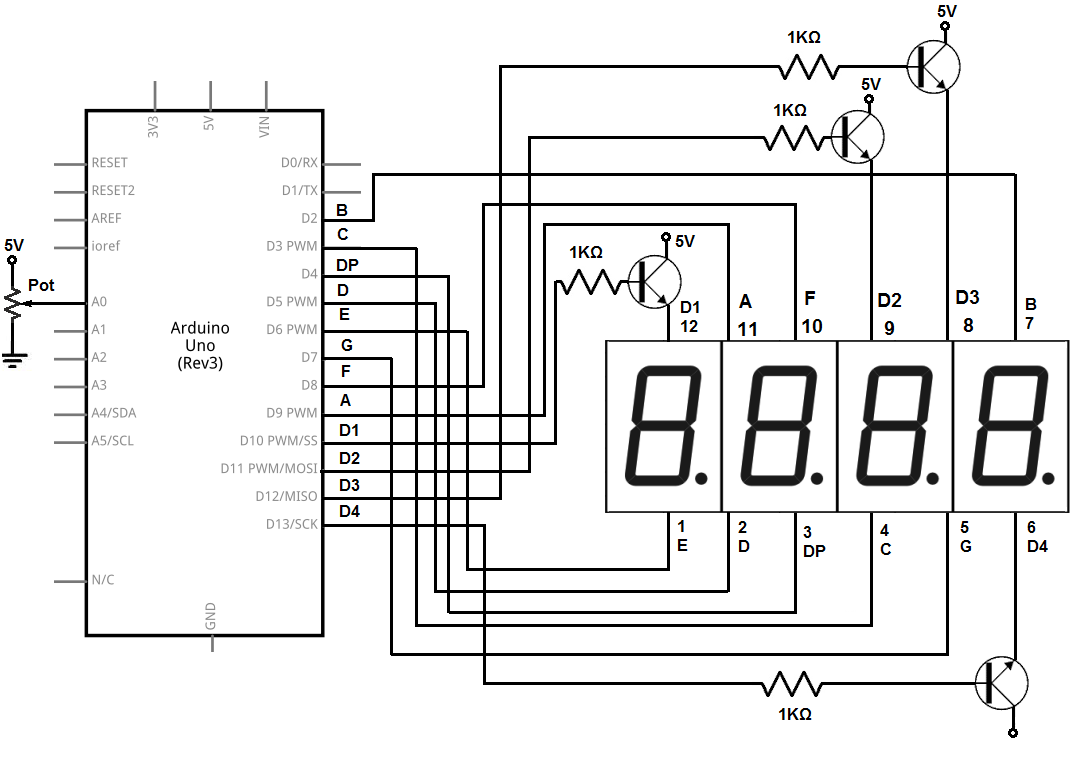
- Connect segment pins (A–G, DP) to Arduino digital pins through current-limiting resistors
- Connect digit pins (D1–D4) to Arduino digital pins (for multiplexing)
- Connect common cathode pins to GND
- Use transistors if higher current driving is required
Library:
You can control this display using multiplexing code or libraries such as:
Code:
The code shows the analog value of a sensor connected to the arduino board. The value displayed can range anywhere from 0 to 9999 on a four-digit display. No need for Library
const int sensorPin= 0;//The analog sensor is connected to analog pin 0 of the arduino

//ABCDEFG,dp
const int numeral[10]= {
B11111100, //0
B01100000, //1
B11011010, //2
B11110010, //3
B01100110, //4
B10110110, //5
B00111110, //6
B11100000, //7
B11111110, //8
B11100110, //9
};

//pins for decimal point and each segment
//dp, G, F, E, D, C, B, A
const int segmentPins[]= { 4, 7, 8, 6, 5, 3, 2, 9};

const int numberofDigits=4;

const int digitPins[numberofDigits] = { 10,11,12, 13}; //digits 1, 2, 3, 4

void setup()
{

for (int i=0; i < 8; i++)
pinMode(segmentPins[i], OUTPUT); //set segment and DP pins to output

//sets the digit pins as outputs
for (int i=0; i < numberofDigits; i++)
pinMode(digitPins[i], OUTPUT);
}

void loop()
{
int value= analogRead(sensorPin);
showNumber(value);
}

void showNumber (int number)
{
if (number == 0)
showDigit (0, numberofDigits-1); //display 0 in the rightmost digit
else
{
for (int digit= numberofDigits-1; digit >=0; digit--)
{
if (number > 0)
{
showDigit(number % 10, digit);
number= number/10;
}
}
}
}

//Displays given number on a 7-segment display at the given digit position
void showDigit (int number, int digit)
{
digitalWrite(digitPins[digit], HIGH);
for (int segment= 1; segment < 8; segment++)
{
boolean isBitSet= bitRead(numeral[number], segment);

isBitSet= ! isBitSet; //remove this line if common cathode display
digitalWrite(segmentPins[segment], isBitSet);
}
delay(5);
digitalWrite(digitPins[digit], LOW);
}
Technical Details:
- Model: SR42056
- Display Type: 4-digit 7-segment LED
- Configuration: Common Cathode
- Display Color: Red
- Operating Voltage: 3.3V – 5V
- Dimensions: 42 × 24 × 12 mm
- Temperature Display Range: -9°C to 60°C
- Temperature Calibration Range: -5°C to +5°C
Resources:
Features:
- 4-digit 7-segment LED display with bright red illumination
- Common cathode configuration for easy interfacing
- Supports numeric (0–9), hexadecimal (A–F), and basic symbols
- Standard 2.54mm pin spacing compatible with breadboards
- Suitable for direct use with microcontrollers
- Low cost and efficient display solution
- Works with 3.3V to 5V systems
- Widely used in household appliances and embedded systems
Principle of Work:
The display operates by lighting specific LED segments to form numbers or characters. In a common cathode configuration, the selected digit is activated by connecting its cathode to ground, while the required segments are powered by applying a positive voltage.
To display multiple digits, multiplexing is used. The microcontroller rapidly switches between digits, activating one digit at a time while updating the segment data. Due to persistence of vision, all digits appear continuously lit to the human eye.
Pinout:
- Segment Pins (A–G, DP): Control individual LED segments
- Digit Pins (D1–D4): Select active digit (common cathode)
- Common Cathode: Connect to GND
Applications:
- Digital clocks and timers
- Temperature and voltage displays
- Counters and scoreboards
- Household appliances (microwaves, washing machines, etc.)
- Embedded system user interfaces
- Educational and prototyping projects
Circuit:
- Connect segment pins (A–G, DP) to Arduino digital pins through current-limiting resistors
- Connect digit pins (D1–D4) to Arduino digital pins (for multiplexing)
- Connect common cathode pins to GND
- Use transistors if higher current driving is required
Library:
You can control this display using multiplexing code or libraries such as:
Code:
The code shows the analog value of a sensor connected to the arduino board. The value displayed can range anywhere from 0 to 9999 on a four-digit display. No need for Library
const int sensorPin= 0;//The analog sensor is connected to analog pin 0 of the arduino

//ABCDEFG,dp
const int numeral[10]= {
B11111100, //0
B01100000, //1
B11011010, //2
B11110010, //3
B01100110, //4
B10110110, //5
B00111110, //6
B11100000, //7
B11111110, //8
B11100110, //9
};

//pins for decimal point and each segment
//dp, G, F, E, D, C, B, A
const int segmentPins[]= { 4, 7, 8, 6, 5, 3, 2, 9};

const int numberofDigits=4;

const int digitPins[numberofDigits] = { 10,11,12, 13}; //digits 1, 2, 3, 4

void setup()
{

for (int i=0; i < 8; i++)
pinMode(segmentPins[i], OUTPUT); //set segment and DP pins to output

//sets the digit pins as outputs
for (int i=0; i < numberofDigits; i++)
pinMode(digitPins[i], OUTPUT);
}

void loop()
{
int value= analogRead(sensorPin);
showNumber(value);
}

void showNumber (int number)
{
if (number == 0)
showDigit (0, numberofDigits-1); //display 0 in the rightmost digit
else
{
for (int digit= numberofDigits-1; digit >=0; digit--)
{
if (number > 0)
{
showDigit(number % 10, digit);
number= number/10;
}
}
}
}

//Displays given number on a 7-segment display at the given digit position
void showDigit (int number, int digit)
{
digitalWrite(digitPins[digit], HIGH);
for (int segment= 1; segment < 8; segment++)
{
boolean isBitSet= bitRead(numeral[number], segment);

isBitSet= ! isBitSet; //remove this line if common cathode display
digitalWrite(segmentPins[segment], isBitSet);
}
delay(5);
digitalWrite(digitPins[digit], LOW);
}
Technical Details:
- Model: SR42056
- Display Type: 4-digit 7-segment LED
- Configuration: Common Cathode
- Display Color: Red
- Operating Voltage: 3.3V – 5V
- Dimensions: 42 × 24 × 12 mm
- Temperature Display Range: -9°C to 60°C
- Temperature Calibration Range: -5°C to +5°C