Features
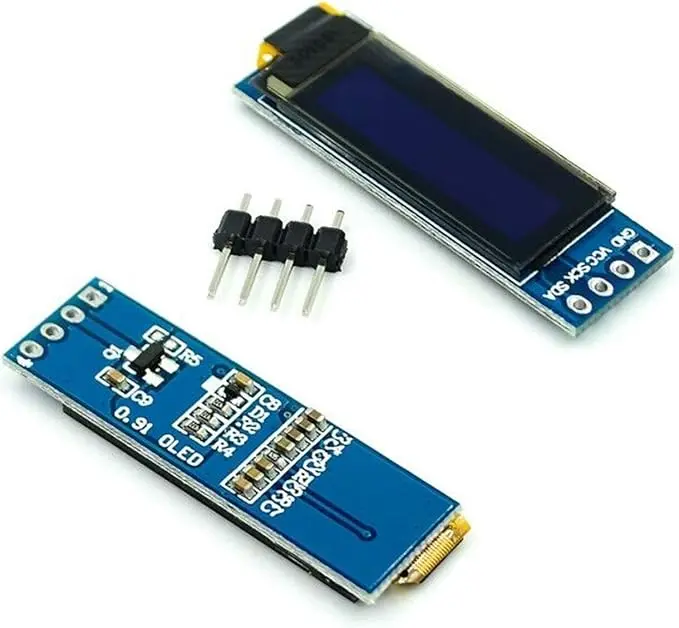
- 0.91-inch monochrome OLED display.
- SSD1306 display controller.
- 128 × 32 pixel resolution.
- I2C communication interface for simplified wiring.
- High contrast with excellent viewing angles.
- No backlight required for low power consumption.
- Fast display refresh suitable for graphics and animations.
- Compatible with Arduino, ESP32, ESP8266, Raspberry Pi, STM32, and other microcontrollers.
- Supports text, graphics, icons, and bitmap images.
- Compact size for embedded and portable projects.
Principle of Operation
The module uses the SSD1306 OLED driver IC to control an array of self-emitting OLED pixels. Commands and display data are transmitted through the I2C interface, where the controller stores the information in display memory and refreshes the pixels automatically.
Since OLED technology generates light at each individual pixel, no backlight is required. This results in excellent contrast, faster response times, lower power consumption, and improved visibility compared to conventional LCD displays.
Applications
- Arduino display projects
- ESP32 and ESP8266 IoT devices
- Raspberry Pi projects
- Digital clocks
- Sensor monitoring systems
- Portable measurement instruments
- Weather stations
- Battery-powered electronics
- Industrial control displays
- DIY electronics and educational projects
Pinout
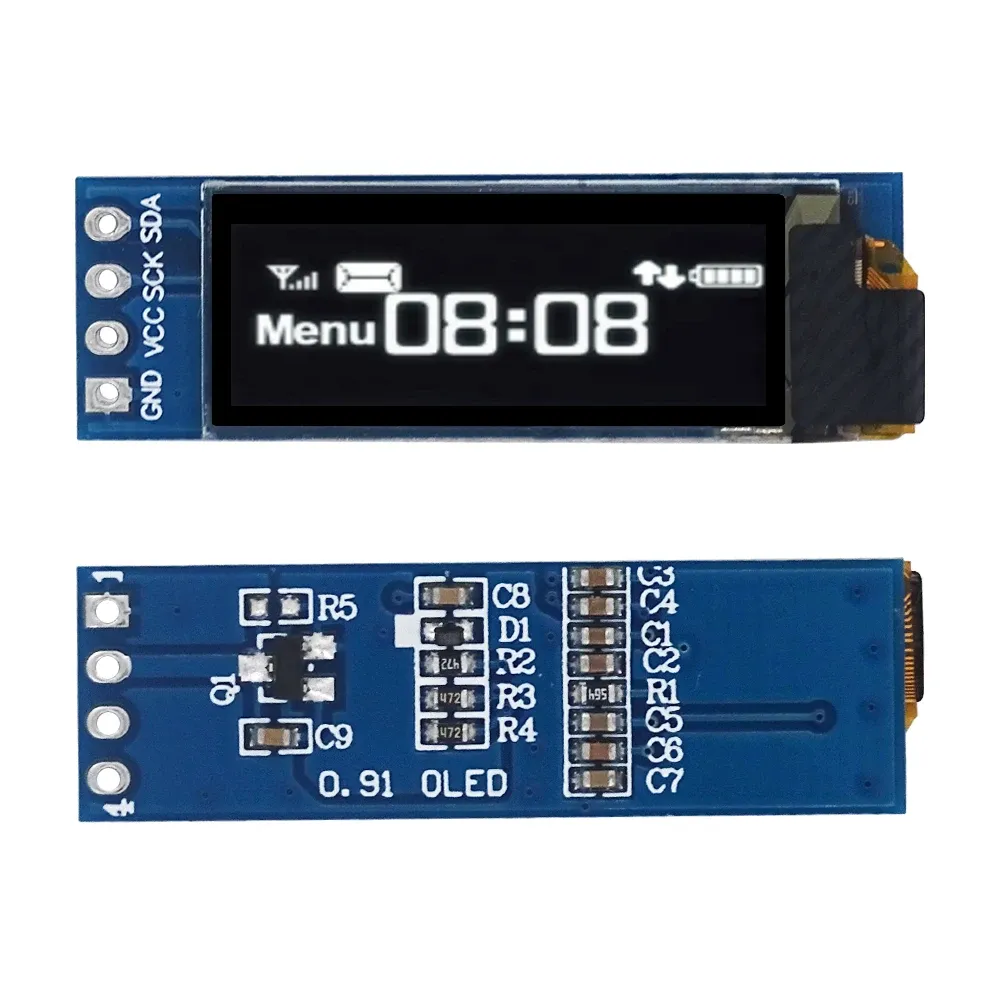
| Pin | Function |
|---|---|
| VCC | Power Supply (3.3V–5V) |
| GND | Ground |
| SCL | I2C Clock Line |
| SDA | I2C Data Line |
Wiring

The display communicates through the I2C interface, requiring only four connections. Most Arduino and ESP development boards support I2C communication directly through dedicated SDA and SCL pins.
| OLED Pin | Arduino UNO | ESP32 |
|---|---|---|
| VCC | 5V | 3.3V |
| GND | GND | GND |
| SCL | A5 (SCL) | GPIO22 (Default) |
| SDA | A4 (SDA) | GPIO21 (Default) |
Library
Install the following libraries using the Arduino Library Manager (Sketch → Include Library → Manage Libraries):
- Adafruit SSD1306
- Adafruit GFX Library
Default I²C Address: 0x3C (Some modules use 0x3D.)
Arduino Code
#include "Wire.h"
#include "Adafruit_GFX.h"
#include "Adafruit_SSD1306.h"
#define SCREEN_WIDTH 128
#define SCREEN_HEIGHT 32
Adafruit_SSD1306 display(SCREEN_WIDTH, SCREEN_HEIGHT, &Wire, -1);
void setup() {
 if(!display.begin(SSD1306_SWITCHCAPVCC, 0x3C)) {
 while(true);
 }
 display.clearDisplay();
 display.setTextSize(2);
 display.setTextColor(SSD1306_WHITE);
 display.setCursor(0, 8);
 display.println("Hello!");
 display.display();
}
void loop() {
}
Specifications
| Product Type | OLED Display Module |
| Display Controller | SSD1306 |
| Display Size | 0.91 Inch |
| Resolution | 128 × 32 Pixels |
| Display Technology | OLED |
| Display Color | White |
| Communication Interface | I2C (IIC) |
| Operating Voltage | 3.3V – 5V |
| Viewing Angle | Wide Viewing Angle (>160° Typical) |
| Power Consumption | Very Low |
Resources
- SSD1306 Datasheet: https://cdn-shop.adafruit.com/datasheets/SSD1306.pdf
- Adafruit SSD1306 Library: https://github.com/adafruit/Adafruit_SSD1306
- Adafruit GFX Library: https://github.com/adafruit/Adafruit-GFX-Library
- Arduino Wire (I²C) Library: https://docs.arduino.cc/learn/communication/wire/
- Arduino IDE: https://www.arduino.cc/en/software
Features
- 0.91-inch monochrome OLED display.
- SSD1306 display controller.
- 128 × 32 pixel resolution.
- I2C communication interface for simplified wiring.
- High contrast with excellent viewing angles.
- No backlight required for low power consumption.
- Fast display refresh suitable for graphics and animations.
- Compatible with Arduino, ESP32, ESP8266, Raspberry Pi, STM32, and other microcontrollers.
- Supports text, graphics, icons, and bitmap images.
- Compact size for embedded and portable projects.
Principle of Operation
The module uses the SSD1306 OLED driver IC to control an array of self-emitting OLED pixels. Commands and display data are transmitted through the I2C interface, where the controller stores the information in display memory and refreshes the pixels automatically.
Since OLED technology generates light at each individual pixel, no backlight is required. This results in excellent contrast, faster response times, lower power consumption, and improved visibility compared to conventional LCD displays.
Applications
- Arduino display projects
- ESP32 and ESP8266 IoT devices
- Raspberry Pi projects
- Digital clocks
- Sensor monitoring systems
- Portable measurement instruments
- Weather stations
- Battery-powered electronics
- Industrial control displays
- DIY electronics and educational projects
Pinout
| Pin | Function |
|---|---|
| VCC | Power Supply (3.3V–5V) |
| GND | Ground |
| SCL | I2C Clock Line |
| SDA | I2C Data Line |
Wiring
The display communicates through the I2C interface, requiring only four connections. Most Arduino and ESP development boards support I2C communication directly through dedicated SDA and SCL pins.
| OLED Pin | Arduino UNO | ESP32 |
|---|---|---|
| VCC | 5V | 3.3V |
| GND | GND | GND |
| SCL | A5 (SCL) | GPIO22 (Default) |
| SDA | A4 (SDA) | GPIO21 (Default) |
Library
Install the following libraries using the Arduino Library Manager (Sketch → Include Library → Manage Libraries):
- Adafruit SSD1306
- Adafruit GFX Library
Default I²C Address: 0x3C (Some modules use 0x3D.)
Arduino Code
#include "Wire.h"
#include "Adafruit_GFX.h"
#include "Adafruit_SSD1306.h"
#define SCREEN_WIDTH 128
#define SCREEN_HEIGHT 32
Adafruit_SSD1306 display(SCREEN_WIDTH, SCREEN_HEIGHT, &Wire, -1);
void setup() {
 if(!display.begin(SSD1306_SWITCHCAPVCC, 0x3C)) {
 while(true);
 }
 display.clearDisplay();
 display.setTextSize(2);
 display.setTextColor(SSD1306_WHITE);
 display.setCursor(0, 8);
 display.println("Hello!");
 display.display();
}
void loop() {
}
Specifications
| Product Type | OLED Display Module |
| Display Controller | SSD1306 |
| Display Size | 0.91 Inch |
| Resolution | 128 × 32 Pixels |
| Display Technology | OLED |
| Display Color | White |
| Communication Interface | I2C (IIC) |
| Operating Voltage | 3.3V – 5V |
| Viewing Angle | Wide Viewing Angle (>160° Typical) |
| Power Consumption | Very Low |
Resources
- SSD1306 Datasheet: https://cdn-shop.adafruit.com/datasheets/SSD1306.pdf
- Adafruit SSD1306 Library: https://github.com/adafruit/Adafruit_SSD1306
- Adafruit GFX Library: https://github.com/adafruit/Adafruit-GFX-Library
- Arduino Wire (I²C) Library: https://docs.arduino.cc/learn/communication/wire/
- Arduino IDE: https://www.arduino.cc/en/software