Features
- Converts standard RS232 signals to TTL/CMOS UART levels.
- Converts TTL/CMOS UART signals back to RS232 levels.
- Built around the MAX3232 RS232 transceiver.
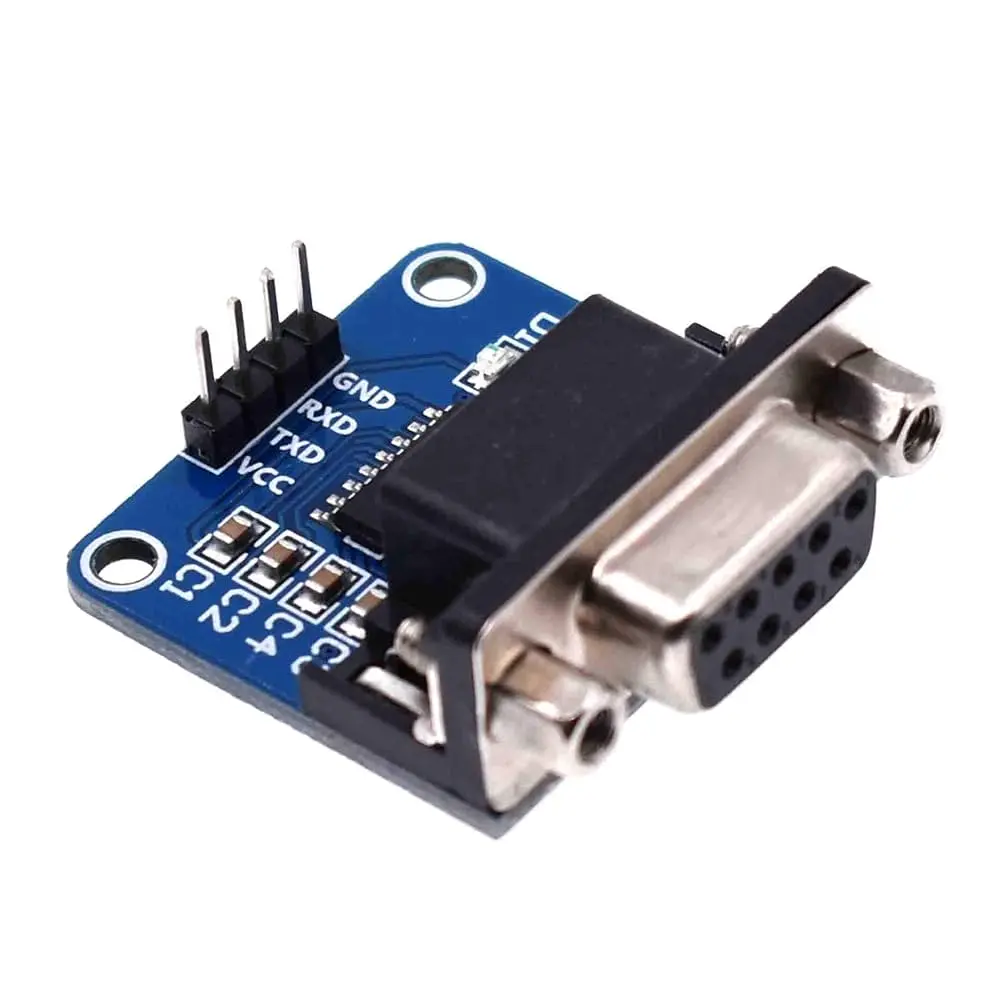
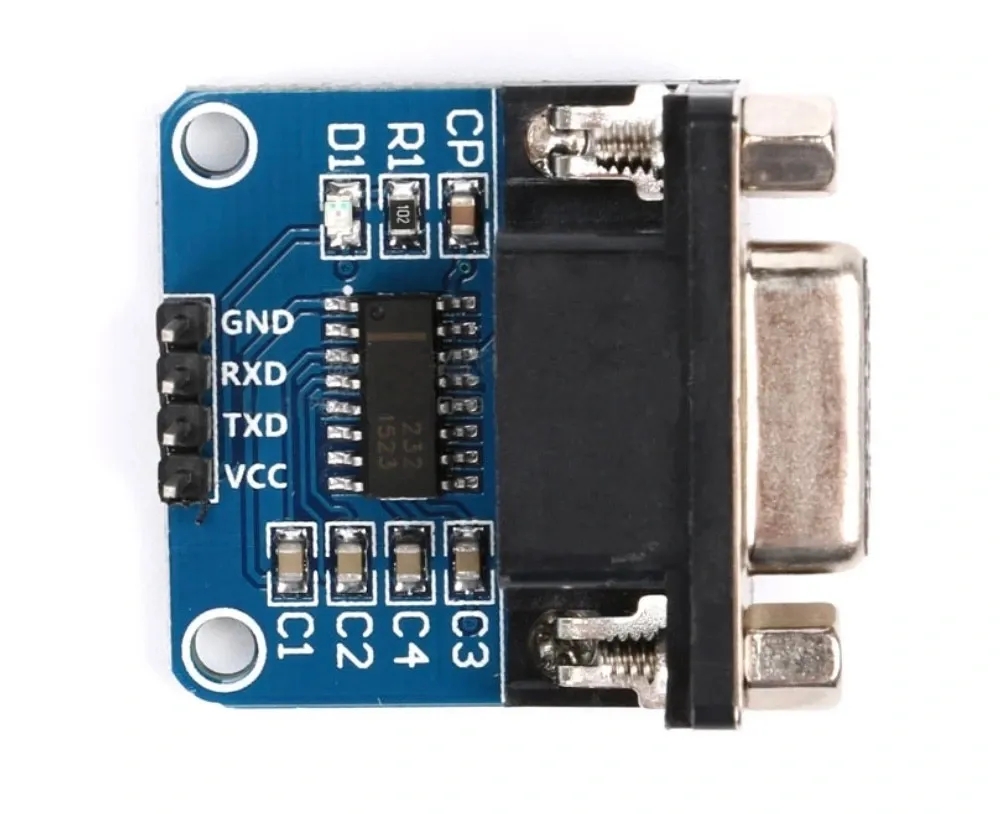
- Integrated DB9 connector for convenient RS232 device connection.
- Supports communication between PCs, RS232 equipment, and microcontrollers.
- Compatible with Arduino, AVR, ARM, and other UART-based systems.
- Supports low-voltage microcontroller UART interfaces.
- Simple TX, RX, VCC, and GND connections on the TTL side.
- Useful for serial debugging and embedded-system development.
- Compact and easy to integrate into electronic projects.
Principle of Operation
RS232 and TTL UART use different electrical voltage levels and signal polarities, so they cannot normally be connected directly. The MAX3232 acts as the interface between these two signal standards.
When transmitting data from a microcontroller to an RS232 device, the module receives the microcontroller's TTL-level UART signal through the TX input and converts it into the appropriate RS232 electrical signal for the DB9 interface.
When receiving data from an RS232 device, the module converts the RS232 signal received through the DB9 connector into a TTL/CMOS UART signal that can be safely processed by the connected microcontroller.
The conversion is performed electrically by the MAX3232 transceiver, allowing the two devices to communicate using their respective serial voltage standards.
Applications
- Connecting Arduino boards to RS232 equipment.
- PC-to-microcontroller serial communication.
- Serial debugging and configuration.
- Industrial equipment communication.
- Legacy RS232 device interfacing.
- Embedded-system development.
- AVR and ARM microcontroller projects.
- Serial communication with laboratory equipment.
- Adding an RS232 interface to UART-based systems.
- Development and testing of serial communication systems.
Pinout

| Pin | Name | Description |
|---|---|---|
| 1 | VCC | Power supply input. The module supports approximately 3.3V to 5.5V according to the provided specifications. |
| 2 | TX | TTL/UART transmit signal. Connect to the receiving RX pin of the microcontroller. |
| 3 | RX | TTL/UART receive signal. Connect to the transmitting TX pin of the microcontroller. |
| 4 | GND | Ground connection. |
DB9 RS232 Interface
The module includes a standard DB9 connector for connecting to compatible RS232 equipment such as computers, industrial controllers, instruments, and legacy serial devices. The DB9 side carries RS232-level signals, while the module header provides the converted UART signals for the microcontroller.
Wiring
Connect the TTL side of the module to the microcontroller UART. The TX pin from the module sho
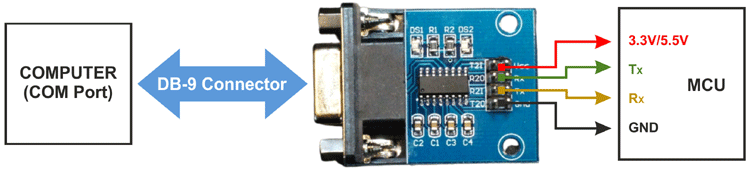 uld connect to the microcontroller's RX pin, while the module's RX pin should connect to the microcontroller's TX pin.
| MAX3232 Module | Microcontroller |
|---|---|
| VCC | 3.3V or 5V, according to the module requirements |
| GND | GND |
| TX | UART RX |
| RX | UART TX |
Important: Do not connect the RS232 DB9 signals directly to a microcontroller's TTL UART pins. The MAX3232 module must be used as the voltage-level interface between the two standards.
Serial Communication
UART communication requires the transmitting and receiving devices to use compatible serial settings. In a typical setup, both devices should use the same baud rate, data-bit configuration, parity, and stop-bit configuration.
For example, a common configuration is 9600 baud, 8 data bits, no parity, and 1 stop bit (8N1). The actual settings should match those required by the connected RS232 equipment.
UART is asynchronous, meaning that no separate clock line is required. The transmitting and receiving devices use their configured baud rate to determine when individual bits are transmitted and sampled.
Arduino Example
void setup() {
  Serial.begin(9600);

  Serial.println("MAX3232 RS232 to TTL Converter");
  Serial.println("Serial communication ready.");
}

void loop() {
  if (Serial.available()) {
    char receivedData = Serial.read();

    Serial.print("Received: ");
    Serial.println(receivedData);
  }

  delay(10);
}This basic example demonstrates serial communication using the Arduino hardware UART. The actual baud rate and serial configuration should be changed to match the connected RS232 device.
Library
No external Arduino library is required. The MAX3232 is a hardware-level UART transceiver and can be used with the standard Arduino Serial interface or other compatible UART communication functions.
Technical Specifications
| Parameter | Specification |
|---|---|
| Converter Type | RS232 to TTL/CMOS UART |
| Main IC | MAX3232 |
| Operating Voltage | 3.3V–5.5V |
| Interface | UART / RS232 |
| TTL Signals | TX, RX |
| RS232 Connector | DB9 |
| Communication Type | Asynchronous serial communication |
| Microcontroller Compatibility | Arduino, AVR, ARM, and other UART-compatible systems |
| Logic Interface | TTL/CMOS UART |
Important Notes
- RS232 and TTL UART are electrically different interfaces and require level conversion.
- Use the MAX3232 module between the DB9 RS232 interface and the microcontroller UART.
- Connect TX to RX and RX to TX when wiring the TTL side.
- The transmitting and receiving devices must use compatible UART communication settings.
- The exact DB9 signal assignment can depend on the module's implementation and connected RS232 equipment.
- Verify the required power supply before connecting the module to your system.
- This module is an interface converter; it does not convert USB directly to TTL or RS232.
Resources
Features
- Converts standard RS232 signals to TTL/CMOS UART levels.
- Converts TTL/CMOS UART signals back to RS232 levels.
- Built around the MAX3232 RS232 transceiver.
- Integrated DB9 connector for convenient RS232 device connection.
- Supports communication between PCs, RS232 equipment, and microcontrollers.
- Compatible with Arduino, AVR, ARM, and other UART-based systems.
- Supports low-voltage microcontroller UART interfaces.
- Simple TX, RX, VCC, and GND connections on the TTL side.
- Useful for serial debugging and embedded-system development.
- Compact and easy to integrate into electronic projects.
Principle of Operation
RS232 and TTL UART use different electrical voltage levels and signal polarities, so they cannot normally be connected directly. The MAX3232 acts as the interface between these two signal standards.
When transmitting data from a microcontroller to an RS232 device, the module receives the microcontroller's TTL-level UART signal through the TX input and converts it into the appropriate RS232 electrical signal for the DB9 interface.
When receiving data from an RS232 device, the module converts the RS232 signal received through the DB9 connector into a TTL/CMOS UART signal that can be safely processed by the connected microcontroller.
The conversion is performed electrically by the MAX3232 transceiver, allowing the two devices to communicate using their respective serial voltage standards.
Applications
- Connecting Arduino boards to RS232 equipment.
- PC-to-microcontroller serial communication.
- Serial debugging and configuration.
- Industrial equipment communication.
- Legacy RS232 device interfacing.
- Embedded-system development.
- AVR and ARM microcontroller projects.
- Serial communication with laboratory equipment.
- Adding an RS232 interface to UART-based systems.
- Development and testing of serial communication systems.
Pinout
| Pin | Name | Description |
|---|---|---|
| 1 | VCC | Power supply input. The module supports approximately 3.3V to 5.5V according to the provided specifications. |
| 2 | TX | TTL/UART transmit signal. Connect to the receiving RX pin of the microcontroller. |
| 3 | RX | TTL/UART receive signal. Connect to the transmitting TX pin of the microcontroller. |
| 4 | GND | Ground connection. |
DB9 RS232 Interface
The module includes a standard DB9 connector for connecting to compatible RS232 equipment such as computers, industrial controllers, instruments, and legacy serial devices. The DB9 side carries RS232-level signals, while the module header provides the converted UART signals for the microcontroller.
Wiring
Connect the TTL side of the module to the microcontroller UART. The TX pin from the module sho
uld connect to the microcontroller's RX pin, while the module's RX pin should connect to the microcontroller's TX pin.
| MAX3232 Module | Microcontroller |
|---|---|
| VCC | 3.3V or 5V, according to the module requirements |
| GND | GND |
| TX | UART RX |
| RX | UART TX |
Important: Do not connect the RS232 DB9 signals directly to a microcontroller's TTL UART pins. The MAX3232 module must be used as the voltage-level interface between the two standards.
Serial Communication
UART communication requires the transmitting and receiving devices to use compatible serial settings. In a typical setup, both devices should use the same baud rate, data-bit configuration, parity, and stop-bit configuration.
For example, a common configuration is 9600 baud, 8 data bits, no parity, and 1 stop bit (8N1). The actual settings should match those required by the connected RS232 equipment.
UART is asynchronous, meaning that no separate clock line is required. The transmitting and receiving devices use their configured baud rate to determine when individual bits are transmitted and sampled.
Arduino Example
void setup() {
  Serial.begin(9600);

  Serial.println("MAX3232 RS232 to TTL Converter");
  Serial.println("Serial communication ready.");
}

void loop() {
  if (Serial.available()) {
    char receivedData = Serial.read();

    Serial.print("Received: ");
    Serial.println(receivedData);
  }

  delay(10);
}
This basic example demonstrates serial communication using the Arduino hardware UART. The actual baud rate and serial configuration should be changed to match the connected RS232 device.
Library
No external Arduino library is required. The MAX3232 is a hardware-level UART transceiver and can be used with the standard Arduino Serial interface or other compatible UART communication functions.
Technical Specifications
| Parameter | Specification |
|---|---|
| Converter Type | RS232 to TTL/CMOS UART |
| Main IC | MAX3232 |
| Operating Voltage | 3.3V–5.5V |
| Interface | UART / RS232 |
| TTL Signals | TX, RX |
| RS232 Connector | DB9 |
| Communication Type | Asynchronous serial communication |
| Microcontroller Compatibility | Arduino, AVR, ARM, and other UART-compatible systems |
| Logic Interface | TTL/CMOS UART |
Important Notes
- RS232 and TTL UART are electrically different interfaces and require level conversion.
- Use the MAX3232 module between the DB9 RS232 interface and the microcontroller UART.
- Connect TX to RX and RX to TX when wiring the TTL side.
- The transmitting and receiving devices must use compatible UART communication settings.
- The exact DB9 signal assignment can depend on the module's implementation and connected RS232 equipment.
- Verify the required power supply before connecting the module to your system.
- This module is an interface converter; it does not convert USB directly to TTL or RS232.