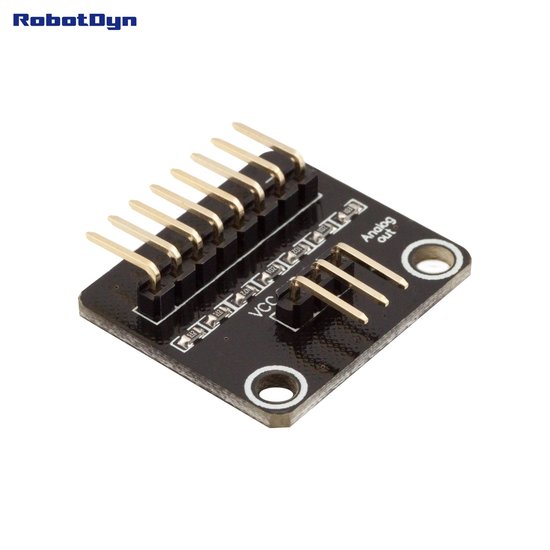
Features
- Designed for use with RobotDyn membrane matrix keypads.
- Converts keypad matrix signals into a single analog voltage output.
- Reduces the number of microcontroller GPIO pins required.
- Suitable for Arduino, ESP32, ESP8266, and other microcontroller platforms with an analog input.
- Simple connection and integration.
- Compact module suitable for embedded and DIY electronics projects.
Principle of Operation
The adaptor uses the keypad matrix connections to generate different voltage levels depending on the key being pressed. The analog output is connected to an analog input of the microcontroller.
The microcontroller reads the analog value and determines the pressed key by comparing the measured voltage with the expected value for each keypad button. This allows multiple keypad buttons to be detected through a single analog input instead of using multiple digital GPIO pins.
Library Needed
No dedicated library is required. The analog output can be read using the standard analog input functions available on the selected microcontroller platform, such as analogRead() on Arduino-compatible boards.
Simple Usage
Connect the adaptor's analog output to an available analog input and read the voltage level using the microcontroller. The measured values can then be mapped to individual keypad buttons.
Because analog readings can vary between boards and power supplies, it is recommended to measure and record the actual analog values for each key and use suitable thresholds in the program.
Applications
- Arduino keypad projects.
- ESP32 and ESP8266 user interfaces.
- Menu navigation systems.
- DIY control panels.
- Remote control interfaces.
- Embedded systems with limited GPIO availability.
- Projects requiring a keypad with minimal wiring.
Pinout

| Connection | Function |
|---|---|
| VCC | Power supply |
| GND | Ground |
| AOUT | Analog voltage output to the microcontroller |
Wiring

| Adaptor | Microcontroller |
|---|---|
| VCC | Compatible power supply |
| GND | GND |
| AOUT | Analog input pin |
Usage Notes
- Connect the analog output to an analog input pin on the microcontroller.
- Read the analog value to determine which keypad button is pressed.
- Analog voltage levels should be calibrated on the target microcontroller for reliable key detection.
- The required supply voltage depends on the adaptor and connected microcontroller. Use a compatible voltage level for the specific hardware.
- Make sure the microcontroller's analog input can safely accept the voltage produced by the adaptor.
Technical Specifications
| Specification | Details |
|---|---|
| Product Type | Keypad analog output adaptor |
| Input | RobotDyn membrane keypad matrix |
| Output | Analog voltage signal |
| Microcontroller Interface | Analog input |
| Compatible Platforms | Arduino, ESP32, ESP8266, and other compatible microcontrollers |
Features
- Designed for use with RobotDyn membrane matrix keypads.
- Converts keypad matrix signals into a single analog voltage output.
- Reduces the number of microcontroller GPIO pins required.
- Suitable for Arduino, ESP32, ESP8266, and other microcontroller platforms with an analog input.
- Simple connection and integration.
- Compact module suitable for embedded and DIY electronics projects.
Principle of Operation
The adaptor uses the keypad matrix connections to generate different voltage levels depending on the key being pressed. The analog output is connected to an analog input of the microcontroller.
The microcontroller reads the analog value and determines the pressed key by comparing the measured voltage with the expected value for each keypad button. This allows multiple keypad buttons to be detected through a single analog input instead of using multiple digital GPIO pins.
Library Needed
No dedicated library is required. The analog output can be read using the standard analog input functions available on the selected microcontroller platform, such as analogRead() on Arduino-compatible boards.
Simple Usage
Connect the adaptor's analog output to an available analog input and read the voltage level using the microcontroller. The measured values can then be mapped to individual keypad buttons.
Because analog readings can vary between boards and power supplies, it is recommended to measure and record the actual analog values for each key and use suitable thresholds in the program.
Applications
- Arduino keypad projects.
- ESP32 and ESP8266 user interfaces.
- Menu navigation systems.
- DIY control panels.
- Remote control interfaces.
- Embedded systems with limited GPIO availability.
- Projects requiring a keypad with minimal wiring.
Pinout
| Connection | Function |
|---|---|
| VCC | Power supply |
| GND | Ground |
| AOUT | Analog voltage output to the microcontroller |
Wiring
| Adaptor | Microcontroller |
|---|---|
| VCC | Compatible power supply |
| GND | GND |
| AOUT | Analog input pin |
Usage Notes
- Connect the analog output to an analog input pin on the microcontroller.
- Read the analog value to determine which keypad button is pressed.
- Analog voltage levels should be calibrated on the target microcontroller for reliable key detection.
- The required supply voltage depends on the adaptor and connected microcontroller. Use a compatible voltage level for the specific hardware.
- Make sure the microcontroller's analog input can safely accept the voltage produced by the adaptor.
Technical Specifications
| Specification | Details |
|---|---|
| Product Type | Keypad analog output adaptor |
| Input | RobotDyn membrane keypad matrix |
| Output | Analog voltage signal |
| Microcontroller Interface | Analog input |
| Compatible Platforms | Arduino, ESP32, ESP8266, and other compatible microcontrollers |