Features
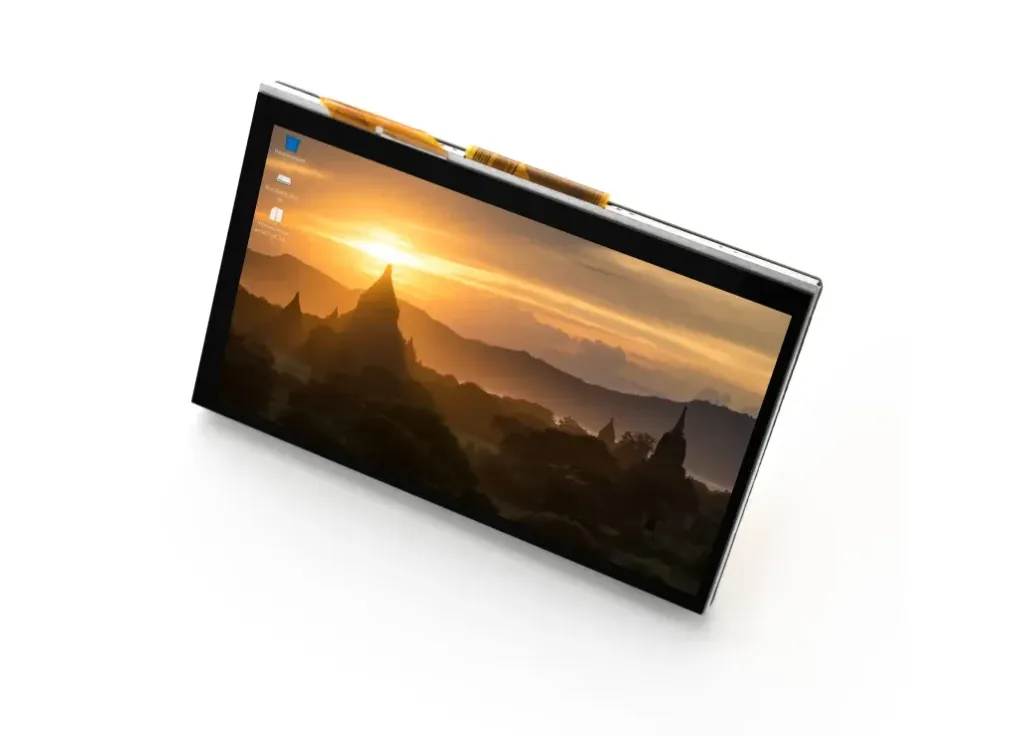
- 7-Inch Touchscreen: Provides a 7-inch display area suitable for graphical user interfaces, dashboards, and interactive applications.
- 800 × 480 Resolution: Provides sufficient resolution for Raspberry Pi desktop interfaces and embedded graphical applications.
- 5-Point Capacitive Touch: Supports up to five simultaneous touch points for gestures and multi-touch interaction.
- MIPI DSI Interface: Connects directly to the Raspberry Pi's DSI display interface for digital video transmission.
- Driver-Free Integration: Designed for straightforward integration with compatible Raspberry Pi OS environments without requiring a separate HDMI display interface.
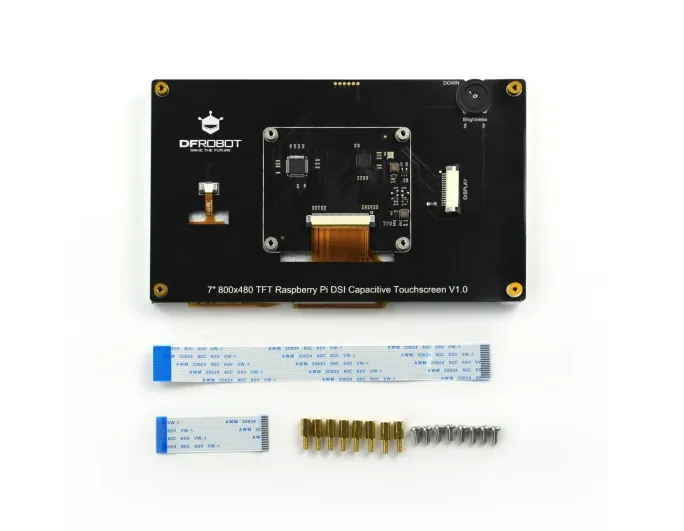
- Integrated Raspberry Pi Mounting: The rear chassis includes mounting provisions for installing a compatible Raspberry Pi board behind the display.
- Broad OS Support: Suitable for Raspberry Pi OS and compatible Linux distributions such as Ubuntu and Kali Linux, depending on the Raspberry Pi model and software configuration.
- Compact Embedded Design: Suitable for building interactive control panels, kiosks, dashboards, and portable Raspberry Pi systems.
Principle of Operation
The display receives digital video data directly from the Raspberry Pi through its MIPI DSI interface. The Raspberry Pi generates the graphical content, while the DSI interface transfers the display data to the screen for rendering.
The capacitive touch layer detects changes in the electrical field caused by a user's finger. The touchscreen controller processes these changes and reports the touch coordinates back to the Raspberry Pi, allowing applications to respond to taps, gestures, and multi-touch input.
This direct DSI connection eliminates the need to use an HDMI cable for video output, helping create a cleaner and more compact Raspberry Pi installation.
Applications
- Raspberry Pi touchscreen projects
- Industrial and machine control panels
- Home automation interfaces
- Smart home dashboards
- IoT control interfaces
- Interactive kiosks
- Digital information displays
- Point-of-sale interfaces
- Embedded Linux systems
- Robotics control panels
- Portable Raspberry Pi projects
- Educational and STEM projects
Display Interface

| Interface | Description |
|---|---|
| MIPI DSI | Digital display interface used to connect the touchscreen to a compatible Raspberry Pi DSI connector. |
| Touch Interface | Capacitive touch input integrated into the display system. |
Wiring and Installation
Connect the display to a compatible Raspberry Pi using the supplied MIPI DSI FPC ribbon cable. The cable should be installed in the correct orientation according to the display and Raspberry Pi connector markings.

| Display | Raspberry Pi |
|---|---|
| MIPI DSI | Compatible Raspberry Pi DSI display connector |
| Touch | Integrated capacitive touch interface |
After connecting the display, power the Raspberry Pi using its recommended power supply. The Raspberry Pi OS environment should detect and initialize the compatible DSI display automatically when the hardware and software configuration are supported.
Raspberry Pi Compatibility

The DFR0678 is designed for use with compatible Raspberry Pi boards that provide the required MIPI DSI display interface. When using newer Raspberry Pi models, the physical connector configuration may differ from older boards.
Touchscreen Operation
The integrated capacitive touchscreen supports up to 5 simultaneous touch points. This enables common touchscreen interactions such as tapping, dragging, scrolling, and multi-touch gestures when supported by the operating system and application.
The touchscreen is particularly useful for Raspberry Pi applications where physical buttons, keyboards, or mice are inconvenient, allowing the display to function as a complete graphical user interface.
Technical Specifications
| Specification | Details |
|---|---|
| Brand / Manufacturer | DFRobot |
| Model Number | DFR0678 |
| Display Size | 7 Inches |
| Resolution | 800 × 480 Pixels |
| Display Interface | MIPI DSI |
| Touch Technology | Capacitive Touch |
| Touch Points | 5-Point Multi-Touch |
| Active Viewing Area | 154.08mm × 85.92mm |
Important Notes
- Verify that your Raspberry Pi model provides a compatible MIPI DSI display interface before purchasing.
- Handle the FPC ribbon cable carefully and avoid sharply bending or damaging the cable.
- Make sure the ribbon cable is inserted in the correct orientation before powering the system.
- Raspberry Pi 5 installations may require a suitable 15-pin to 22-pin DSI adapter cable.
- Operating system compatibility can depend on the Raspberry Pi model and installed software version.
- The display is intended for use with compatible Raspberry Pi hardware and should be powered according to the manufacturer's requirements.
Resources
Features
- 7-Inch Touchscreen: Provides a 7-inch display area suitable for graphical user interfaces, dashboards, and interactive applications.
- 800 × 480 Resolution: Provides sufficient resolution for Raspberry Pi desktop interfaces and embedded graphical applications.
- 5-Point Capacitive Touch: Supports up to five simultaneous touch points for gestures and multi-touch interaction.
- MIPI DSI Interface: Connects directly to the Raspberry Pi's DSI display interface for digital video transmission.
- Driver-Free Integration: Designed for straightforward integration with compatible Raspberry Pi OS environments without requiring a separate HDMI display interface.
- Integrated Raspberry Pi Mounting: The rear chassis includes mounting provisions for installing a compatible Raspberry Pi board behind the display.
- Broad OS Support: Suitable for Raspberry Pi OS and compatible Linux distributions such as Ubuntu and Kali Linux, depending on the Raspberry Pi model and software configuration.
- Compact Embedded Design: Suitable for building interactive control panels, kiosks, dashboards, and portable Raspberry Pi systems.
Principle of Operation
The display receives digital video data directly from the Raspberry Pi through its MIPI DSI interface. The Raspberry Pi generates the graphical content, while the DSI interface transfers the display data to the screen for rendering.
The capacitive touch layer detects changes in the electrical field caused by a user's finger. The touchscreen controller processes these changes and reports the touch coordinates back to the Raspberry Pi, allowing applications to respond to taps, gestures, and multi-touch input.
This direct DSI connection eliminates the need to use an HDMI cable for video output, helping create a cleaner and more compact Raspberry Pi installation.
Applications
- Raspberry Pi touchscreen projects
- Industrial and machine control panels
- Home automation interfaces
- Smart home dashboards
- IoT control interfaces
- Interactive kiosks
- Digital information displays
- Point-of-sale interfaces
- Embedded Linux systems
- Robotics control panels
- Portable Raspberry Pi projects
- Educational and STEM projects
Display Interface
| Interface | Description |
|---|---|
| MIPI DSI | Digital display interface used to connect the touchscreen to a compatible Raspberry Pi DSI connector. |
| Touch Interface | Capacitive touch input integrated into the display system. |
Wiring and Installation
Connect the display to a compatible Raspberry Pi using the supplied MIPI DSI FPC ribbon cable. The cable should be installed in the correct orientation according to the display and Raspberry Pi connector markings.
| Display | Raspberry Pi |
|---|---|
| MIPI DSI | Compatible Raspberry Pi DSI display connector |
| Touch | Integrated capacitive touch interface |
After connecting the display, power the Raspberry Pi using its recommended power supply. The Raspberry Pi OS environment should detect and initialize the compatible DSI display automatically when the hardware and software configuration are supported.
Raspberry Pi Compatibility
The DFR0678 is designed for use with compatible Raspberry Pi boards that provide the required MIPI DSI display interface. When using newer Raspberry Pi models, the physical connector configuration may differ from older boards.
Touchscreen Operation
The integrated capacitive touchscreen supports up to 5 simultaneous touch points. This enables common touchscreen interactions such as tapping, dragging, scrolling, and multi-touch gestures when supported by the operating system and application.
The touchscreen is particularly useful for Raspberry Pi applications where physical buttons, keyboards, or mice are inconvenient, allowing the display to function as a complete graphical user interface.
Technical Specifications
| Specification | Details |
|---|---|
| Brand / Manufacturer | DFRobot |
| Model Number | DFR0678 |
| Display Size | 7 Inches |
| Resolution | 800 × 480 Pixels |
| Display Interface | MIPI DSI |
| Touch Technology | Capacitive Touch |
| Touch Points | 5-Point Multi-Touch |
| Active Viewing Area | 154.08mm × 85.92mm |
Important Notes
- Verify that your Raspberry Pi model provides a compatible MIPI DSI display interface before purchasing.
- Handle the FPC ribbon cable carefully and avoid sharply bending or damaging the cable.
- Make sure the ribbon cable is inserted in the correct orientation before powering the system.
- Raspberry Pi 5 installations may require a suitable 15-pin to 22-pin DSI adapter cable.
- Operating system compatibility can depend on the Raspberry Pi model and installed software version.
- The display is intended for use with compatible Raspberry Pi hardware and should be powered according to the manufacturer's requirements.