Features
- Integrated 1D and 2D barcode recognition engine.
- Onboard image processing for barcode decoding.
- No external image recognition algorithm is required on the host controller.
- Supports common 1D barcodes and 2D codes.
- Reads QR Code, PDF417, and Data Matrix codes.
- Supports barcode reading from paper, screens, and plastic surfaces.
- Auxiliary illumination for low-light and dark environments.
- USB interface for connection to computers and compatible host systems.
- UART serial interface for embedded system integration.
- Quick cold and warm startup.
- Low power consumption and low heat generation.
- Configuration can be performed using setup/configuration codes.
- Adjustable reading modes.
- Adjustable UART baud rate.
- Supports command mode configuration.
- Configurable sound/tone output.
- Configurable barcode output format.
- Barcode type filtering can be configured according to the application.
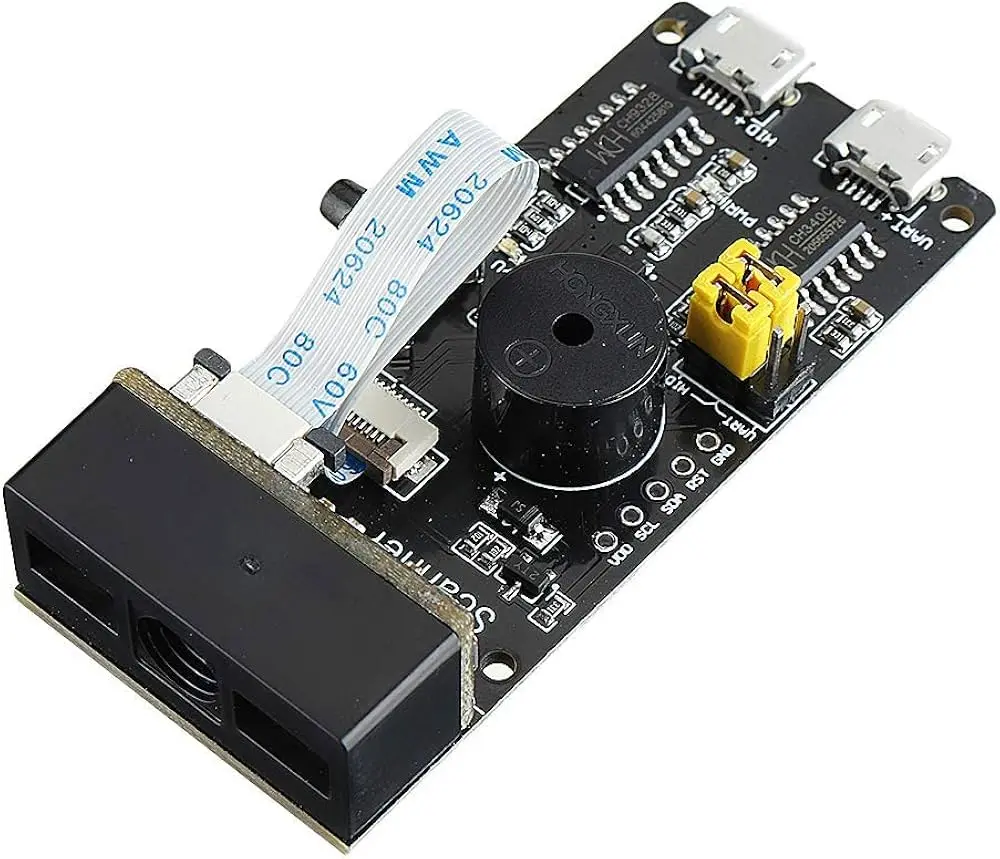
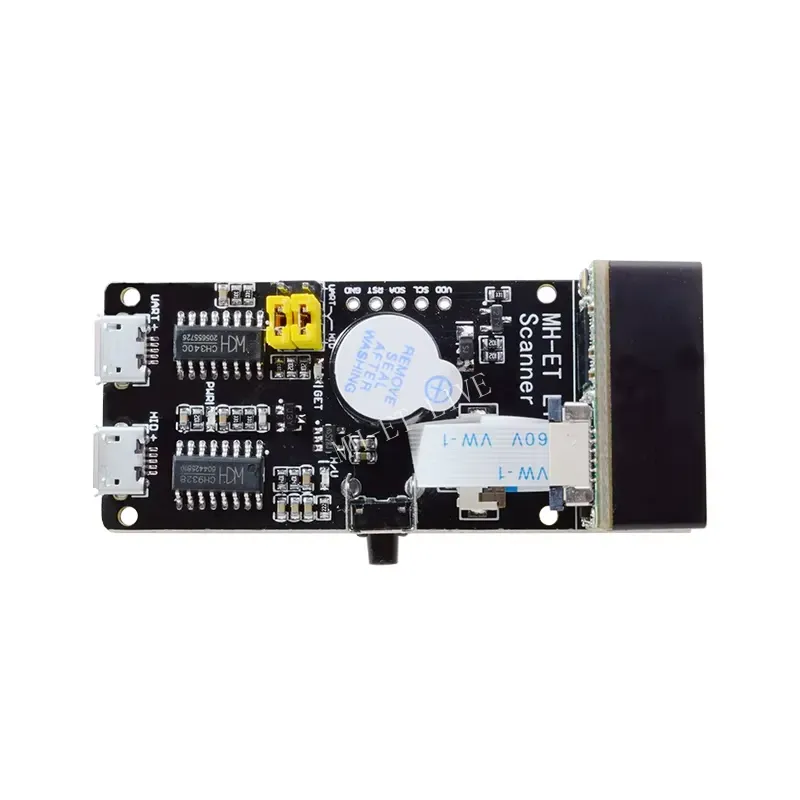
- Compact size of approximately 65 × 28 × 13.5 mm.
Principle of Operation
The scanner module uses an onboard imaging system to capture the barcode or QR code. The integrated image processing chip analyzes the captured image and identifies the encoded data.
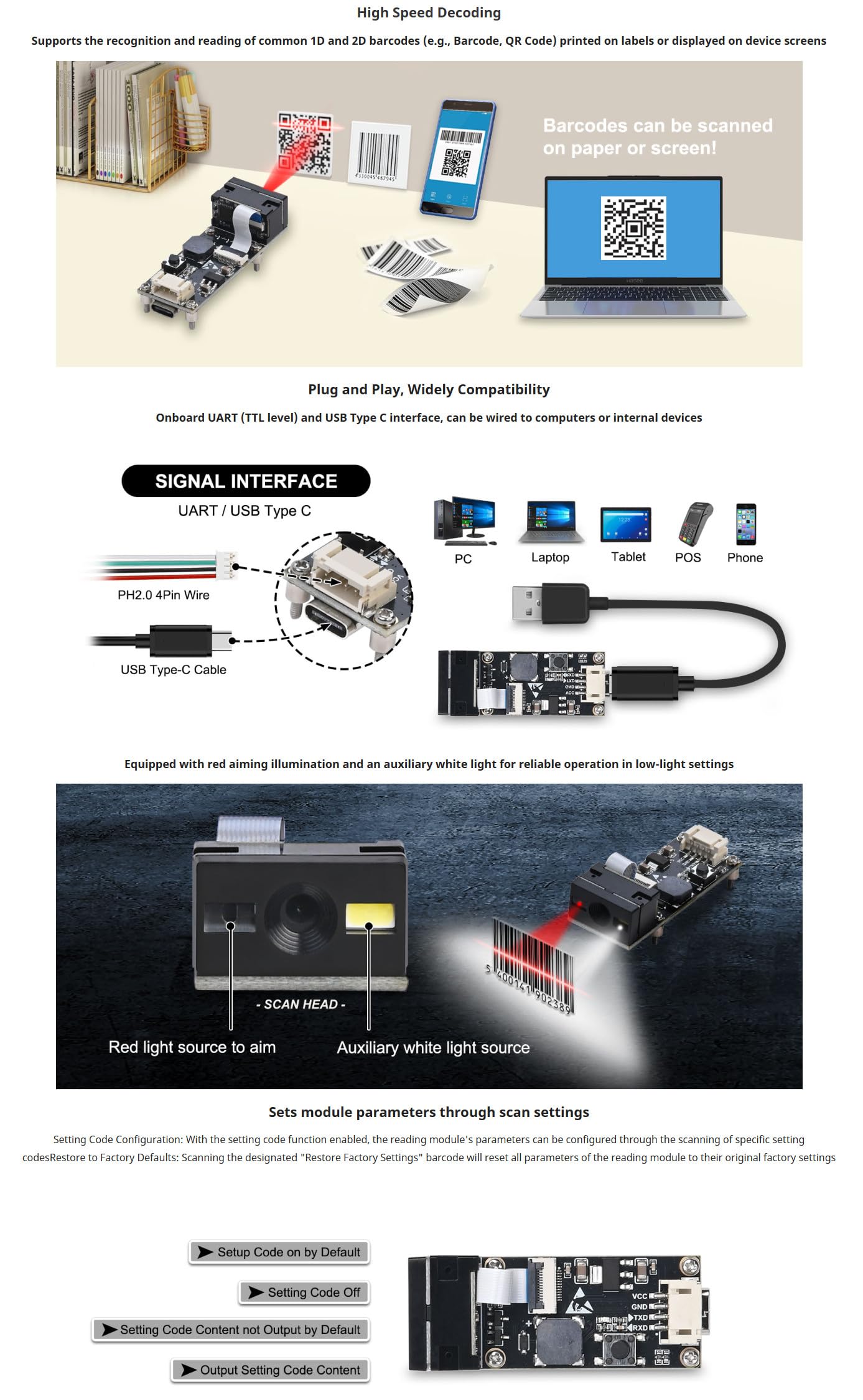
After successful recognition, the decoded information is transmitted to the connected host through the selected interface. This means that the host system receives the barcode data rather than having to process the camera image itself.
For example, when a QR code contains the text PRODUCT-12345, the scanner can decode the symbol and send the corresponding data to the host system through USB or UART.
Barcode Recognition Supported 1D Barcodes
The module supports a wide range of commonly used linear and two-dimensional barcode formats.
- UPC/EAN
- BooklandEAN
- ISSN
- UCC Coupon
- Code 128
- GS1-128
- ISBT 128
- Code 39
- Code 93
- Code 11
- Interleaved 2 of 5
- Discrete 2 of 5
- Codabar
- MSI
- GS1 DataBar
- Other supported linear barcode formats
Supported 2D Codes
- QR Code
- PDF417
- Data Matrix
Reading from Different Surfaces
The scanner can be used to read codes printed on conventional paper labels as well as codes displayed electronically on screens. It can also be used with suitable barcode labels printed or applied to plastic surfaces. Reading performance depends on factors such as code quality, size, contrast, surface condition, viewing angle, ambient lighting, and the distance between the scanner and the code.
Auxiliary Lighting
The integrated auxiliary light source helps illuminate the scanning area when ambient light is insufficient. This allows the scanner to continue operating in low-light environments and can assist with reading codes where conventional room lighting is not available.
The auxiliary illumination is particularly useful for enclosed equipment, cabinets, automated machines, counters, and other installations where the scanner cannot rely on strong ambient lighting.
USB Interface
The module includes a Micro USB interface that can be used to connect the scanner to a compatible computer or host system.
USB connectivity is useful for applications where barcode data needs to be transferred directly to a PC or other USB-compatible host without designing a separate UART interface circuit.
UART Interface
The onboard UART serial interface provides a direct communication method for embedded systems. A microcontroller or single-board computer with a compatible serial interface can receive the decoded barcode data and use it within the application.
UART integration is suitable for applications such as inventory systems, access control, automated equipment, embedded terminals, and custom barcode readers.
Typical UART Data Flow
| Step | Operation |
|---|---|
| 1 | Barcode or QR code is placed in front of the scanner. |
| 2 | The imaging system captures the code. |
| 3 | The onboard processor analyzes and decodes the image. |
| 4 | The decoded information is transmitted to the host. |
| 5 | The host application processes or stores the received barcode data. |
Configuration
The scanner provides configurable operating parameters that can be adjusted according to the application. Configuration can be performed using setup codes supplied for the scanner.
Available configuration options include:
- Reading mode.
- UART baud rate.
- Command mode.
- Tone or sound output.
- Data output format.
- Barcode type filtering.
Barcode type filtering can be useful when a system only needs to recognize specific barcode formats. Disabling unnecessary barcode types can simplify operation in applications where only selected formats are required.
Reading Modes
The scanner's reading behavior can be configured according to the intended application. Depending on the selected configuration, the scanner can be adjusted for different barcode reading requirements.
For automated systems, the preferred reading configuration can be selected using the supported setup codes rather than requiring changes to the host software.
Sound and Status Feedback
The module supports configurable tone output. This can provide an audible indication when a barcode has been successfully recognized, allowing the operator to receive immediate feedback without checking the host display.
Library Needed
No dedicated barcode recognition library is required on the host system for normal operation. The barcode decoding is performed by the scanner module itself.
When using the UART interface, the host only needs to read the serial data sent by the scanner. When using USB, the appropriate communication method depends on how the module is presented to the connected host system.
Arduino and Microcontroller Integration
The UART interface can be used to integrate the scanner with compatible microcontrollers. The host controller receives the decoded barcode information as serial data and can then use it to control other parts of the application.
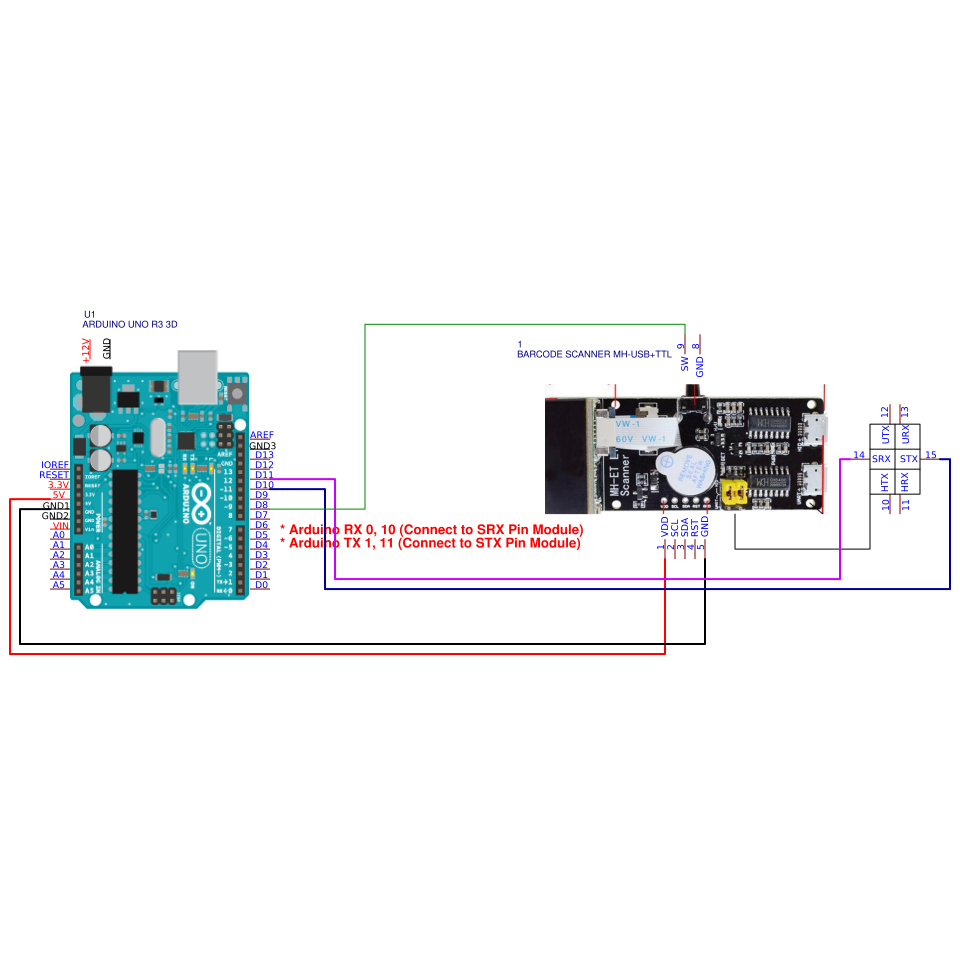
Possible functions include checking a product ID, activating a relay, opening an access gate, updating an inventory record, selecting a menu item, or triggering an automated process.
Wiring
- Scanner TX -> Connect to Arduino Pin 10 (RX)
- Scanner RX -> Connect to Arduino Pin 11 (TX)
- GND -> Connect scanner Ground to Arduino Ground
- VCC/Power -> Connect scanner power to appropriate external or 5V supply
Simple UART Example
The following example demonstrates the basic concept of receiving scanner data through a hardware serial interface. The exact serial port and baud rate should be configured according to the scanner settings and the selected microcontroller.
#include <SoftwareSerial.h>

// Initialize SoftwareSerial on pin 10 (RX) and pin 11 (TX)
SoftwareSerial barcodeSerial(10, 11);

void setup() {
 Serial.begin(9600); // Start the main serial monitor for debugging
 barcodeSerial.begin(9600); // Start the software serial at your barcode scanner's baud rate
}

void loop() {
 // Check if data is available from the software serial port (pins 10 and 11)
 if (barcodeSerial.available()) {
 String barcode = barcodeSerial.readStringUntil('\n');
 Serial.print("Barcode: ");
 Serial.println(barcode);
 }
}
For a real installation, configure the scanner and host with the same UART communication parameters and use the appropriate line-ending or data-format settings.
Applications
- Retail and point-of-sale systems.
- Inventory management.
- Product identification.
- Warehouse barcode scanning.
- Access control systems.
- Ticket and event verification.
- Industrial automation.
- Production line identification.
- Embedded barcode readers.
- Self-service terminals.
- Arduino and ESP32 projects.
- Raspberry Pi projects.
- Custom data collection systems.
- Electronic cabinets and automated equipment.
Embedded System Integration
The compact form factor makes the scanner suitable for integration into custom electronic equipment. The host controller can receive the decoded barcode data and connect it to an existing database, inventory system, display, actuator, or control process.
For example, an embedded inventory terminal can scan a product barcode, receive the decoded product number through UART, and then use that value to search a local database or update an inventory record.
USB and UART Comparison
| Interface | Typical Application |
|---|---|
| USB | Computer and USB host connection |
| UART | Microcontrollers and embedded systems |
Technical Specifications
| Specification | Details |
|---|---|
| Product Type | 2D Barcode Recognition Scanner Module |
| Version | V3.0 |
| Recognition | 1D and 2D barcode recognition |
| Supported 2D Codes | QR Code, PDF417, Data Matrix |
| Supported 1D Codes | UPC/EAN, BooklandEAN, ISSN, UCC Coupon, Code 128, GS1-128, ISBT 128, Code 39, Code 93, Code 11, Interleaved 2 of 5, Discrete 2 of 5, Codabar, MSI, GS1 DataBar, and more |
| Interfaces | USB and UART |
| Auxiliary Lighting | Integrated light source for low-light operation |
| Configuration | Setup/configuration codes |
| Dimensions | 65 × 28 × 13.5 mm |
| Power Characteristics | Low power consumption and low heat generation |
Important Notes
- Scanning performance depends on barcode quality, contrast, size, surface, viewing angle, and lighting conditions.
- Highly reflective, damaged, distorted, or very low-contrast codes may be more difficult to recognize.
- Make sure the selected UART baud rate and communication settings match the host system.
- When integrating the module into an embedded system, verify the voltage levels and UART signal compatibility before connecting the interface.
- The auxiliary light improves operation in dark environments but does not guarantee successful recognition of every barcode under all conditions.
- Use the appropriate setup/configuration codes when changing scanner parameters.
- The module performs barcode decoding internally, reducing the processing requirements of the host controller.
Features
- Integrated 1D and 2D barcode recognition engine.
- Onboard image processing for barcode decoding.
- No external image recognition algorithm is required on the host controller.
- Supports common 1D barcodes and 2D codes.
- Reads QR Code, PDF417, and Data Matrix codes.
- Supports barcode reading from paper, screens, and plastic surfaces.
- Auxiliary illumination for low-light and dark environments.
- USB interface for connection to computers and compatible host systems.
- UART serial interface for embedded system integration.
- Quick cold and warm startup.
- Low power consumption and low heat generation.
- Configuration can be performed using setup/configuration codes.
- Adjustable reading modes.
- Adjustable UART baud rate.
- Supports command mode configuration.
- Configurable sound/tone output.
- Configurable barcode output format.
- Barcode type filtering can be configured according to the application.
- Compact size of approximately 65 × 28 × 13.5 mm.
Principle of Operation
The scanner module uses an onboard imaging system to capture the barcode or QR code. The integrated image processing chip analyzes the captured image and identifies the encoded data.
After successful recognition, the decoded information is transmitted to the connected host through the selected interface. This means that the host system receives the barcode data rather than having to process the camera image itself.
For example, when a QR code contains the text PRODUCT-12345, the scanner can decode the symbol and send the corresponding data to the host system through USB or UART.
Barcode Recognition Supported 1D Barcodes
The module supports a wide range of commonly used linear and two-dimensional barcode formats.
- UPC/EAN
- BooklandEAN
- ISSN
- UCC Coupon
- Code 128
- GS1-128
- ISBT 128
- Code 39
- Code 93
- Code 11
- Interleaved 2 of 5
- Discrete 2 of 5
- Codabar
- MSI
- GS1 DataBar
- Other supported linear barcode formats
Supported 2D Codes
- QR Code
- PDF417
- Data Matrix
Reading from Different Surfaces
The scanner can be used to read codes printed on conventional paper labels as well as codes displayed electronically on screens. It can also be used with suitable barcode labels printed or applied to plastic surfaces. Reading performance depends on factors such as code quality, size, contrast, surface condition, viewing angle, ambient lighting, and the distance between the scanner and the code.
Auxiliary Lighting
The integrated auxiliary light source helps illuminate the scanning area when ambient light is insufficient. This allows the scanner to continue operating in low-light environments and can assist with reading codes where conventional room lighting is not available.
The auxiliary illumination is particularly useful for enclosed equipment, cabinets, automated machines, counters, and other installations where the scanner cannot rely on strong ambient lighting.
USB Interface
The module includes a Micro USB interface that can be used to connect the scanner to a compatible computer or host system.
USB connectivity is useful for applications where barcode data needs to be transferred directly to a PC or other USB-compatible host without designing a separate UART interface circuit.
UART Interface
The onboard UART serial interface provides a direct communication method for embedded systems. A microcontroller or single-board computer with a compatible serial interface can receive the decoded barcode data and use it within the application.
UART integration is suitable for applications such as inventory systems, access control, automated equipment, embedded terminals, and custom barcode readers.
Typical UART Data Flow
| Step | Operation |
|---|---|
| 1 | Barcode or QR code is placed in front of the scanner. |
| 2 | The imaging system captures the code. |
| 3 | The onboard processor analyzes and decodes the image. |
| 4 | The decoded information is transmitted to the host. |
| 5 | The host application processes or stores the received barcode data. |
Configuration
The scanner provides configurable operating parameters that can be adjusted according to the application. Configuration can be performed using setup codes supplied for the scanner.
Available configuration options include:
- Reading mode.
- UART baud rate.
- Command mode.
- Tone or sound output.
- Data output format.
- Barcode type filtering.
Barcode type filtering can be useful when a system only needs to recognize specific barcode formats. Disabling unnecessary barcode types can simplify operation in applications where only selected formats are required.
Reading Modes
The scanner's reading behavior can be configured according to the intended application. Depending on the selected configuration, the scanner can be adjusted for different barcode reading requirements.
For automated systems, the preferred reading configuration can be selected using the supported setup codes rather than requiring changes to the host software.
Sound and Status Feedback
The module supports configurable tone output. This can provide an audible indication when a barcode has been successfully recognized, allowing the operator to receive immediate feedback without checking the host display.
Library Needed
No dedicated barcode recognition library is required on the host system for normal operation. The barcode decoding is performed by the scanner module itself.
When using the UART interface, the host only needs to read the serial data sent by the scanner. When using USB, the appropriate communication method depends on how the module is presented to the connected host system.
Arduino and Microcontroller Integration
The UART interface can be used to integrate the scanner with compatible microcontrollers. The host controller receives the decoded barcode information as serial data and can then use it to control other parts of the application.
Possible functions include checking a product ID, activating a relay, opening an access gate, updating an inventory record, selecting a menu item, or triggering an automated process.
Wiring
- Scanner TX -> Connect to Arduino Pin 10 (RX)
- Scanner RX -> Connect to Arduino Pin 11 (TX)
- GND -> Connect scanner Ground to Arduino Ground
- VCC/Power -> Connect scanner power to appropriate external or 5V supply
Simple UART Example
The following example demonstrates the basic concept of receiving scanner data through a hardware serial interface. The exact serial port and baud rate should be configured according to the scanner settings and the selected microcontroller.
#include <SoftwareSerial.h>

// Initialize SoftwareSerial on pin 10 (RX) and pin 11 (TX)
SoftwareSerial barcodeSerial(10, 11);

void setup() {
 Serial.begin(9600); // Start the main serial monitor for debugging
 barcodeSerial.begin(9600); // Start the software serial at your barcode scanner's baud rate
}

void loop() {
 // Check if data is available from the software serial port (pins 10 and 11)
 if (barcodeSerial.available()) {
 String barcode = barcodeSerial.readStringUntil('\n');
 Serial.print("Barcode: ");
 Serial.println(barcode);
 }
}
For a real installation, configure the scanner and host with the same UART communication parameters and use the appropriate line-ending or data-format settings.
Applications
- Retail and point-of-sale systems.
- Inventory management.
- Product identification.
- Warehouse barcode scanning.
- Access control systems.
- Ticket and event verification.
- Industrial automation.
- Production line identification.
- Embedded barcode readers.
- Self-service terminals.
- Arduino and ESP32 projects.
- Raspberry Pi projects.
- Custom data collection systems.
- Electronic cabinets and automated equipment.
Embedded System Integration
The compact form factor makes the scanner suitable for integration into custom electronic equipment. The host controller can receive the decoded barcode data and connect it to an existing database, inventory system, display, actuator, or control process.
For example, an embedded inventory terminal can scan a product barcode, receive the decoded product number through UART, and then use that value to search a local database or update an inventory record.
USB and UART Comparison
| Interface | Typical Application |
|---|---|
| USB | Computer and USB host connection |
| UART | Microcontrollers and embedded systems |
Technical Specifications
| Specification | Details |
|---|---|
| Product Type | 2D Barcode Recognition Scanner Module |
| Version | V3.0 |
| Recognition | 1D and 2D barcode recognition |
| Supported 2D Codes | QR Code, PDF417, Data Matrix |
| Supported 1D Codes | UPC/EAN, BooklandEAN, ISSN, UCC Coupon, Code 128, GS1-128, ISBT 128, Code 39, Code 93, Code 11, Interleaved 2 of 5, Discrete 2 of 5, Codabar, MSI, GS1 DataBar, and more |
| Interfaces | USB and UART |
| Auxiliary Lighting | Integrated light source for low-light operation |
| Configuration | Setup/configuration codes |
| Dimensions | 65 × 28 × 13.5 mm |
| Power Characteristics | Low power consumption and low heat generation |
Important Notes
- Scanning performance depends on barcode quality, contrast, size, surface, viewing angle, and lighting conditions.
- Highly reflective, damaged, distorted, or very low-contrast codes may be more difficult to recognize.
- Make sure the selected UART baud rate and communication settings match the host system.
- When integrating the module into an embedded system, verify the voltage levels and UART signal compatibility before connecting the interface.
- The auxiliary light improves operation in dark environments but does not guarantee successful recognition of every barcode under all conditions.
- Use the appropriate setup/configuration codes when changing scanner parameters.
- The module performs barcode decoding internally, reducing the processing requirements of the host controller.